
🖼️ Bulk Rename & Compress Photos Online – Free Image Renamer Tool
rename jpg • photo rename • image renamer and compress • bulk rename photos
Batch rename files and compress pictures online. Rename images, reduce size, optimize photos fast with one simple tool.
📂 Step 1: Upload Images
Open Image File(s) (0)
tap or drag & drop – supports JPG, PNG, WEBP✏️ Step 2: Rename Images
📋 Preview New Names:
⚡ Step 3: Compress Images
📸 Compressed Images
🔒 Your privacy matters – I built it that way
We do not store any images. All renaming and compression runs directly in your browser (client‑side). No upload, no tracking, no cookies. Your files never leave your device.
The story behind this tool – and why it's different
Hey, I'm Naresh. A few years ago, I was running a small online store selling handmade pottery. Every week I'd photograph maybe 20-30 new items. My camera takes great photos – each one around 4-5MB. But here's the problem: my website would load so slow that people would just leave. And on top of that, my file names were a mess: IMG_8472.jpg, IMG_8473.jpg... impossible to find anything later.
I searched online for a tool that could both rename jpg files and compress them. Most tools did one thing but not the other. Or they'd upload my product photos to some random server. That's when I decided to build my own. It runs entirely in your browser – your photos never leave your computer. Two years later, I still use this tool every single week.
– Naresh, creator of TopImageFixer
How to rename and compress images – step by step
Step 1 – Upload: Click the upload box or drag photos in. You can mix JPG, PNG, WEBP.
Step 2 – Rename: Enter a pattern. For 10 photos, they become "pattern_1.jpg", "pattern_2.jpg", etc.
Step 3 – Compress: Choose format and quality (80% is my go-to). Hit compress.
Step 4 – Download: Save individually or use the ZIP button for everything.
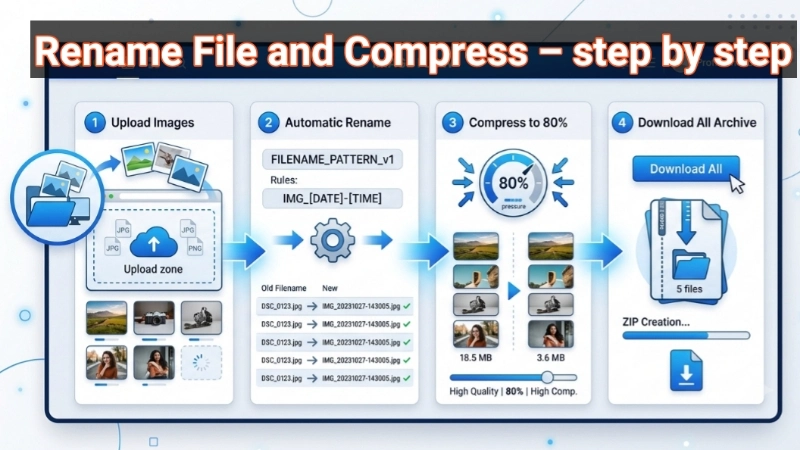
What makes this tool different from others?
1. No upload, ever. Your private photos stay private – whether they're family pictures or product shots.
2. Two tools in one. Rename first (organized files), then compress (web-ready files).
3. Built by someone who actually uses it. I'm a shop owner who got frustrated and built a solution.
4. Zero cost, zero strings. No "premium" features locked away. It's all free forever.
Frequently Asked Questions (FAQ)
Why I keep coming back to this tool (and you will too)
You know that feeling when you're rushing to get work done, and a tool just… gets in your way? That's exactly what I wanted to avoid. Most image tools force you to choose – do you want to rename files OR compress them? But in real life, you almost always need both. Doing both in one place saves me at least 20 minutes every time.
The "no upload" thing isn't just privacy – it's speed. Because your images never leave your device, there's no waiting for uploads or downloads. Your own computer does the work, and it's fast.
I also made sure it works exactly the same on phone and laptop. Same buttons, same steps, same power. Whether you're on an iPhone or on a laptop at your desk.
Look, I'm not trying to build the fanciest tool on the internet. I'm building the one that doesn't waste your time. The one that treats your photos like they're yours. If that resonates with you, keep it bookmarked.
– Naresh, still using this tool every week
⚡ Image Optimizer – more free tools You Might Need
Check these other free Quickly your photos, pictures – most popular tools all private, no upload
📖 Helpful Articles From read our Blog
Batch Image Rename: The Ultimate Guide to Renaming Multiple Photos at Once
What if I told you there’s a way to rename all of them in one go? That’s where the magic of batch image rename comes in.👉Read more ?
How to Bulk Compress Images: Save Hours of Work in Just Minutes
No technical skills needed. No expensive software. Just simple steps that anyone can follow. By the end of this article, you will be compressing 100 photos in under 60 seconds. Yes, really. 👉Read more ?
How to Make a Photo File Size Smaller: The Ultimate Guide (No Software Needed)
No confusing steps. Just real help from someone who has fixed this problem thousands of times. So take a deep breath. You are about to learn a skill that will save you hours of frustration. Let us dive in.👉Read more ?
What formats work here?
JPG, JPEG, PNG, WEBP – for renaming and compressing. More formats coming as people ask.