
🖼️ Change JPEG to BMP – JPG to BMP Image Converter
convert jpg to bmp free • jpg to bmp image converter • change jpg to bmp • convert jpg to bitmap
Convert JPEG/JPG images to BMP format with high quality preservation. BMP format supports lossless quality and is compatible with all systems!
Drag & Drop or Click to Upload JPG Files
Supports multiple JPG, JPEG🔒 Your Privacy Matters – I Built This Differently
Your images never leave your device. Unlike other jpg to bmp converter tools that upload to servers, this one runs entirely in your browser. I built it this way because I hated seeing my photos on unknown servers. When you convert jpg to bmp file here, it stays private. No tracking, no storage, no worries.
Why I Built This JPG to Bitmap Converter – A Small Story
Hey there, I'm Naresh. A few years back, I was helping my uncle with his printing business. He kept getting JPG files from customers, but his printing software needed BMP format. Every day, he'd download random converter tools, most of them sketchy, some asking for money, others uploading customer photos to who-knows-where. One day he accidentally uploaded a client's wedding photos to some server – he felt terrible. That's when I sat down one weekend and built this convert jpg to bmp free tool.
I made sure it works completely offline in your browser. Nothing gets uploaded. My uncle has been using it for two years now – over 5000 images converted, zero privacy issues. His customers are happy, and he doesn't worry about their photos floating around the internet. If you need to change jpg to bmp for printing, editing, or archiving, I hope this tool helps you the way it helped him.
– Naresh, creator of this TopImageFixer (jpg to bmp converter)
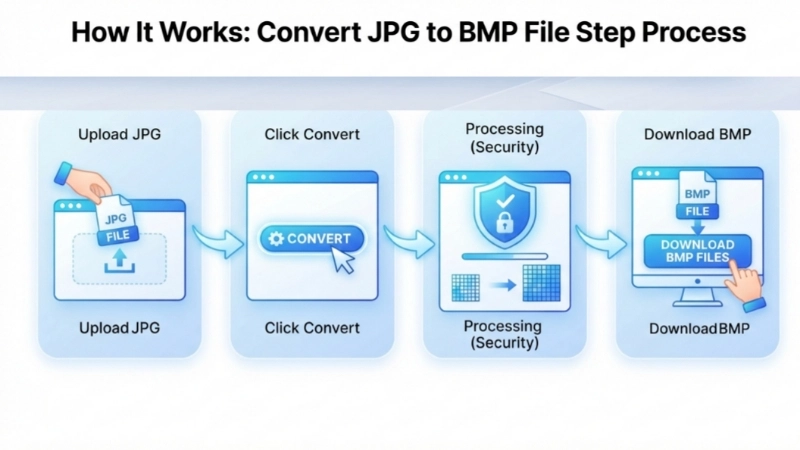
How to Convert JPG to BMP File in 4 Simple Steps
Step 1: Click the upload area and select your JPG files (you can pick multiple).
Step 2: Hit the "Convert JPG to BMP" button. The tool processes each image carefully.
Step 3: Wait 5 seconds – this ensures perfect converting jpg to bitmap quality.
Step 4: Click individual download buttons under each image, or hit "Download All" to get every jpg bmp files at once.
Pro tip: If you're preparing images for print, BMP preserves every pixel perfectly.
Tips for Converting JPG to BMP – What I've Learned
• Start with original JPG: Don't convert a compressed JPG – always use your original files.
• BMP is huge – plan storage: A 5MB JPG can become 30MB BMP. Make sure you have space.
• Batch convert wisely: You can select 20 images at once. Use the "Download All" button for convenience.
• Keep originals: Always keep your original JPG files. BMP is great for specific uses, but JPG is better for sharing online.
When Should You Convert JPG to BMP?
Use BMP when: You're printing photos professionally, editing in software that needs lossless quality, archiving images permanently, or working with medical/scientific imaging where every pixel matters.
Use JPG when: You're sharing on social media, emailing photos, building websites, or storing large collections. JPG's compression saves space.
Both have their place: I personally keep JPG for everyday use and convert jpg to bitmap image only when I need perfect quality for specific projects.
Frequently Asked Questions About JPG to BMP Conversion
⚡ Image Optimizer – more free tools You Might Need
Check these other free Quickly your photos, pictures – most popular tools all private, no upload
📖 Helpful Articles From read our Blog
How to Convert JPG to BMP File: The Ultimate Beginner’s Guide
I will walk you through every step. By the end of this article, you will know exactly how to convert JPEG to BMP using the best method for your needs. We will also explore how to change JPG to BMP quickly and effectively.👉Read more ?
Facebook Image Size for Posts: The Complete Guide for 2026
Here is the thing. Facebook has specific image size requirements. And they are not always obvious. But once you know them, your posts will look sharp, professional, and exactly how you intended. Today, I am going to break down everything you need to know about facebook image size for posts. 👉Read more ?
How to Get 50 KB Photo Size JPG: The Complete Beginner’s Guide
In this guide, I will show you exactly how to get a 50 kb photo size jpg. I will explain what a 50 kb jpg converter does. And I will teach you how to use free tools to get the perfect 50kb photo size jpg every single time.👉Read more ?