
📄Converter PNG to PDF Online Free - File PNG to PDF and Secure, Easy Tool
online convert png to pdf • png to pdf converter online free • convert multiple png to pdf • png to pdf free
Convert PNG images to PDF format instantly. Each PNG file converts to a separate PDF. Download individual PDFs or all PDFs at once without ZIP compression!
Upload PNG Images (0)
Each PNG converts to a separate PDF – It's Free!🔒 Your Privacy Matters – No Upload and Free
Unlike other free online PNG to PDF converters, we never upload your images. Everything runs in your browser. Your PNG files stay on your computer. This means you can convert PNG to PDF format securely, even with sensitive documents. No servers, no tracking, no hidden costs.
What Is a PNG to PDF Converter?
A PNG to PDF Converter is an online tool that allows you to convert PNG image files into PDF documents quickly and easily. Think of it as a friendly bridge between your pictures and a universal document format.
PNG is great for screenshots, product photos, and graphics with text. But sometimes, the people you're sharing with don't want a bunch of loose image files. They want a proper document. That's where PDF comes in. It's the universal standard for sharing, printing, and professional documentation.
Using a Free PNG to PDF Converter like this one, you can transform individual images or multiple PNG files into organized PDF files. Whether you're sending one screenshot to a colleague or a hundred product photos to a printer, this tool makes the process painless. And because it's free and runs in your browser, you don't need to buy expensive software.
Why Convert PNG to PDF? (4 Simple Reasons)
1. Easy File Sharing – PDF files are universally supported. When I send a PDF to a printer or a client, I know it will open exactly as intended. No worrying if they have the right image viewer.
2. Professional Presentation – Sending ten separate PNG files in an email looks messy. Sending one PDF document looks organized and professional.
3. Combine Multiple Images – Instead of attaching five separate screenshots, you can convert them all to PDFs and organize them.
4. Secure & Print-Friendly – PDF is the gold standard for printing. The page size stays consistent, and the image quality remains high.
Why I Built This Free PNG to PDF Converter
Hi, I'm Naresh. A few years ago, I was running a small online business selling handmade wooden toys. I would take photos of my products in PNG format, but every time I needed to send them to a printer, they'd ask for PDFs. I searched for a free online PNG to PDF converter, and while I found many, they all asked me to upload my photos to their servers. That didn't sit right with me.
So, one weekend, I decided to build my own tool. I wanted something that would let me change PNG to PDF without ever sending my files to the cloud. After a few late nights, this free PNG to PDF converter was born. It worked so well for me that I shared it with my neighbor, a graphic designer, and then with a few friends. Now, thousands of people use it every month.
– Naresh, Creator of the Free PNG to PDF Converter
How to Use This Free Online PNG to PDF Converter
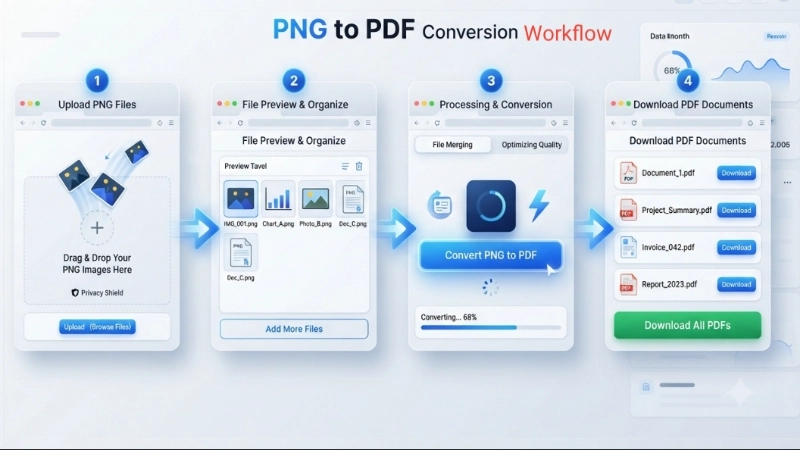
Step 1: Click the upload area and select your PNG files (you can select multiple for batch conversion).
Step 2: You'll see thumbnails of your images. This confirms they're loaded.
Step 3: Click the big blue button that says "Convert PNG to PDF Free". We'll take 5 seconds to ensure quality.
Step 4: After conversion, you can download each PDF individually or click the green "Download All" button to get them all at once.
That's it! You've successfully used our free converter to change PNG to PDF without any upload.
Benefits of Using Our Free PNG to PDF Converter
• 100% Free: No hidden fees, no premium version. It's free forever.
• No Upload = Total Privacy: Your PNG files never leave your device.
• Batch Conversion: Convert multiple PNGs at once. Each becomes its own PDF.
• Exact Quality: We don't compress. Your PDF has the same resolution as your original PNG.
• No Account, No Email: Just upload and convert. No spam.
• Works on All Devices: Use it on your phone, tablet, or laptop.
Changing PNG to PDF – When Is It Useful?
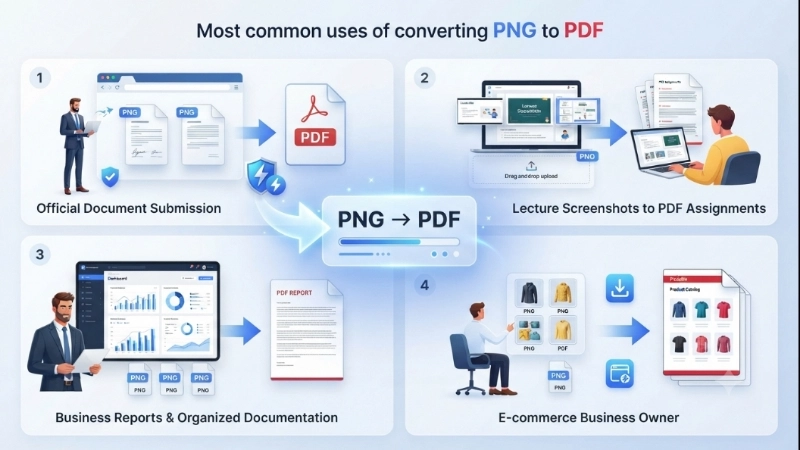
Document Submission
Convert scanned PNG images (like signed forms) into PDF files for official submission.
Academic Projects
Students use this to submit assignments when teachers say "PDF only".
Business Reports
Combine charts and product graphics into one organized PDF document.
Business Owners
Create printable documents like product catalogs or price lists from your product PNG graphics.
Frequently Asked Questions About Converting PNG to PDF
⚡ Image Optimizer – more free tools You Might Need
Check these other free Quickly your photos, pictures – most popular tools all private, no upload
📖 Helpful Articles From read our Blog
How to Convert PNG to PDF: A Complete Beginner’s Guide
I’m going to show you all the ways you can convert PNG file to PDF, from the simplest online tools to built-in features on your computer. And the best part? Most of these methods are completely free.👉Read more ?
Stop Screenshot Spam! Here’s Why You Need a Free Online PNG to PDF Converter
In this guide, I will walk you through everything. I will explain why PNG files are great but also annoying. I will show you exactly how to use a converter png to pdf online free without losing quality. And I will share a tool that does the job in one click.👉Read more ?
How Do I Compress an Image? A Simple Guide to Reduce Photo Size (Without Losing Quality)
I will show you exactly how to compress image size using free tools that anyone can use. And I will explain how can i compress image size without making my photos look like blurry garbage.👉Read more ?