
📐 PNG to SVG Converter Free – Convert PNG to SVG Online and Bulk
png to svg • png svg converter free • change png to svg • png to svg online free
Finally, a png to svg free converter that respects your privacy. Transform PNG images to SVG vector format – perfect for logos, icons, and illustrations.
Upload PNG Images (0)
Multiple files supported – bulk png to svg🔒 Your privacy matters – I built this differently
I built this because I was tired of uploading client logos to sites that kept the files. Everything runs in your browser – zero upload, zero tracking, zero cookies. Your png to svg conversion happens on your device. I can't see your images, and neither can anyone else.
Why I created this free png to svg converter (and why I use it daily)
I'm Naresh – a freelancer who designs websites for small businesses. Every single client sends their logo as a tiny PNG. I used to hunt for "convert png to svg online free" and ended up on sketchy sites that asked for my email or uploaded files to who‑knows‑where. One night, after a logo of a coffee shop appeared on some random website, I decided enough was enough. I coded this tool so that converting png to svg stays 100% private.
Now my brother (who runs an Etsy sticker shop) uses it to turn his hand‑drawn PNGs into clean SVG files for customers. My friend, a teacher, converts diagrams so kids can zoom in on a smartboard. This tool helped us all. I hope it helps you too.
– Naresh, creator of TopImageFixer (png to svg converter)
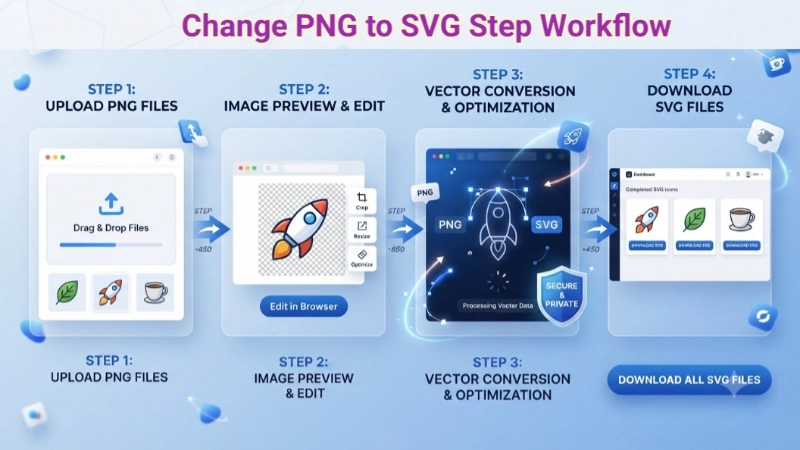
How to change png to svg in 4 simple steps
1. Click the upload box and pick your PNG files (supports batch).
2. See the preview of your selected images.
3. Hit "Convert PNG to SVG". The tool takes about 5 seconds – grab a coffee ☕
4. Download individual SVGs or click "Download All SVG Files". That's it!
Pro tip: After conversion, you can edit the SVG in tools like Inkscape.
Pro tips for converting png to svg (from experience)
• This is an embedding converter – 100% quality, no weird auto‑tracing artifacts.
• SVG files with embedded PNGs are still scalable and can be opened in Illustrator or Affinity.
• Bulk convert png to svg? Yes, the "Download All" button saves each file individually (works on mobile too).
• I always use this for png to svg file conversion before client handoff – they love that it's private.
When to convert png in svg (and when not to)
Use SVG after conversion: logos, icons, illustrations, diagrams, any graphic that needs to be resized.
Stick with PNG: complex photos, images with gradients, screenshots.
With our tool you can convert png to svg online free and keep the best of both worlds.
Frequently asked questions about png to svg converter
⚡ Image Optimizer – more free tools You Might Need
Check these other free Quickly your photos, pictures – most popular tools all private, no upload
📖 Helpful Articles From read our Blog
How to Convert PNG to SVG – A Simple Guide for Beginners
In this guide, I’ll walk you through everything you need to know—what these formats are, why SVG is better in many cases, and exactly how to make the switch.👉Read more ?
PNG to SVG Converter Online – The Ultimate Beginner’s Guide
The solution? Using a PNG to SVG converter online. When you learn how to use an online converter PNG to SVG, you can turn your pixel-based images into scalable vector graphics that stay perfectly crisp at any size.👉Read more ?
How to Crop Photos for Instagram (Without Losing Your Mind or Your Followers)
So if you are here because you keep taking beautiful photos that Instagram keeps chopping off in weird ways, I get you. Learning how to crop photos for instagram changed my social media life. And it will change yours too.👉Read more ?
Also try: convert png to svg online – more formats soon
Need to free convert png to svg? You're in the right place.