
📄 PDF to SVG Converter - Convert PDF Files to Scalable Vector Graphics Online
pdf convert to svg • change pdf to svg • convert from pdf to svg • bulk pdf to svg converter
Need to turn pdf into svg without uploading? This online pdf to svg converter runs 100% in your browser. Each PDF page becomes a separate vector file. Great for web designers, print shops, and anyone who needs pdf to vector file conversion.
Upload PDFs (0)
Each page = separate SVG • Batch ready🔒 Your privacy matters
No upload, no tracking. This free pdf to svg converter works entirely in your browser. Your files never leave your device – perfect for sensitive documents.
Why I built this PDF to SVG converter (a real story)
Hey, I'm Naresh. A few years ago I started a small printing shop. Customers would come in with PDF flyers and say, "Can you pull the logo out as a vector?" I'd nod, but inside I knew most online tools either uploaded their files to some remote server or charged an arm and a leg. One day a client handed me a confidential contract that they needed converted to SVG – they were worried about privacy. That night I sat down and coded this tool.
It's a pdf to svg converter free that does one thing well: convert a pdf to svg without any data leaving your computer. I've been using it for my own clients ever since. My neighbor, who runs an Etsy shop, uses it to turn PDF patterns into SVG for her cutting machine. My cousin the teacher uses it to make classroom materials. No sign-ups, no watermarks – just a pdf to vector file converter that respects your privacy.
– Naresh, creator of TopImageFixer (PDF to SVG Converter)
How to convert PDF to SVG (step by step)
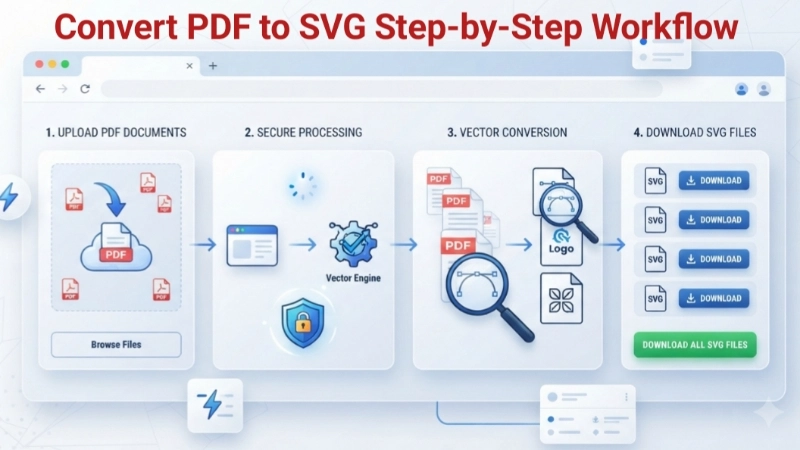
Step 1: Click the upload box and select one or more PDFs. You can also drag and drop – the box turns blue.
Step 2: Hit the blue "Convert PDF to SVG" button. The tool processes each page using pdf to svg conversion that runs locally.
Step 3: After a few seconds, you'll see thumbnails for every SVG page. Each card shows the file name, size, and dimensions.
Step 4: Download individual SVGs by clicking the button under each, or use the green "Download all SVG files" button to get everything at once – each file downloads separately.
Pro tip: If you're a designer, you can open these SVGs in Figma, Canva, or Illustrator. They scale infinitely – no pixelation.
Why convert PDF to SVG? Real‑world benefits
Converting PDF to SVG isn't just a format change – it opens up a world of possibilities. Here's why people do it every day:
- For web designers: SVG is lightweight and scalable. Turn pdf into svg to get crisp logos, icons, and illustrations that look sharp on retina screens.
- For print and laser cutting: Machines like Cricut and laser cutters love SVG. Convert pdf to svg free and send it straight to your cutter.
- For archiving and editing: SVGs are text‑based, so you can open them in any code editor. Need to tweak a color or size? Just change the code.
- Batch conversion: With our bulk pdf to svg converter, you can process entire reports in one go.
Frequently asked questions about PDF to SVG Converter
⚡ Image Optimizer – more free tools You Might Need
Check these other free Quickly your photos, pictures – most popular tools all private, no upload
📖 Helpful Articles From read our Blog
How to Convert PDF to SVG: The Ultimate Guide for Beginners and Pros
How do you get your PDF into this awesome format? Don’t worry, I am going to show you exactly how. By the time you finish reading this, you will be an expert at PDF to SVG conversion. Let’s get started.👉Read more ?
How to Reduce Image Size Without Losing Quality: A Beginner’s Guide
I will show you exactly how to reduce image size without losing quality using simple methods. You will learn practical tips, free tools, and smart tricks. And yes, I will also tell you about a free tool on Top Image Fixer that can do this job in seconds.👉Read more ?
Facebook Cover Photo Size: The Only Guide You Will Ever Need
Today, I am going to teach you everything about facebook cover photo size. The exact dimensions. The safe zones. The common mistakes. And how to get it right every time.👉Read more ?