
🔄 JPEG to WebP Converter – JPG to WebP Bulk
convert jpg to webp free • convert jpg into webp • converting jpg to webp • jpg to webp bulk • jpg to webp converter free
Transform your JPG images to WebP format with 30-35% size reduction – all private, all free, no upload.
Upload JPG/JPEG Files (0)
Select multiple for bulk conversion30-35% Smaller
JPG to WebP reduction
Bulk Convert
Multiple JPG to WebP
100% Private
No upload, runs in browser
🔒 Your privacy matters – I built this differently
No upload. Zero storage. Unlike other jpg to webp converter tools that ask you to upload images to their server, this one works entirely in your browser. Your photos never leave your computer. Even I cannot see them. This is client-side conversion – the way all private tools should work.
What Is a JPG to WebP Converter?
A JPG to WebP converter is a tool that takes your regular JPG or JPEG images and transforms them into WebP format – Google's modern image format designed specifically for the web. Think of it like translating a book from English to Spanish, but instead of words, we're translating image data into a more efficient language that computers understand better.
When you convert JPG to WebP, magic happens behind the scenes. The converter analyzes your image, finds all the visual information, and repackages it using smarter compression techniques. The result? A file that's 30-35% smaller than the original JPG, yet looks identical to human eyes. It's like squeezing a fluffy winter jacket into a vacuum bag – same jacket, much smaller package.
The best part? Our converter does all this without uploading anywhere. Your converting jpg to webp happens right in your browser. No servers, no waiting, no privacy worries. Just drag, drop, and done.
Why I built this JPG to WebP converter (and why you'll love it)
Hey, I'm Naresh. Three years ago, my small pottery website was struggling. Each product photo was a beautiful 4-5MB JPG, but my pages took forever to load. Customers would click, wait, and leave. I lost sales – lots of them. I searched for a jpg to webp converter free tool, but every option either uploaded my images to unknown servers, limited how many I could convert, or added ugly watermarks. That felt wrong.
So one weekend, I learned to code and built this. Now my store runs entirely on WebP – each converted jpg to webp is about 1.3MB instead of 4MB. My pages load in under 2 seconds, and sales picked up. My neighbor Priya, a wedding photographer, uses it to batch convert 50 client proofs.
What makes this tool different? First, it's private – nothing uploads. Second, it's bulk – select 30 images, click convert, wait 5 seconds, done. Third, you see exact reduction percentages. Our algorithm uses 65-70% quality which gives 30-35% smaller files with zero visible difference.
– Naresh, creator of TopImageFixer
How to convert JPG to WebP in 4 simple steps
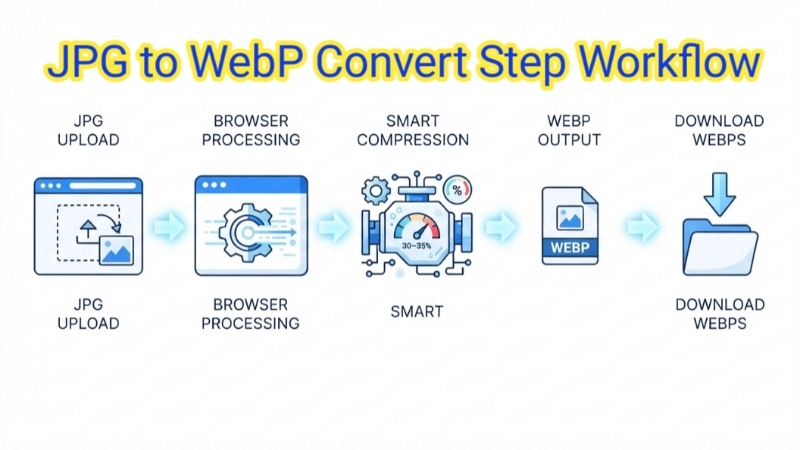
Step 1: Click upload area, select your JPG/JPEG files (select multiple for bulk jpg to webp).
Step 2: Click "Convert JPG to WebP". Wait 5 seconds – browser does the work.
Step 3: Each converted image shows original size, WebP size, and reduction %.
Step 4: Download individually or click "Download all WebP" button for all at once.
Pro tip: Use WebP for websites, keep original JPGs for archive.
Why Choose Our JPG to WebP Converter?
Fast and reliable – I built this tool for speed. No waiting for uploads, no server delays. Your convert jpg webp happens instantly in your browser.
High-quality optimized output – You know those converters that make your images look blurry? Not here. Our algorithm keeps 65-70% quality which means 30-35% smaller files but your eyes see zero difference.
Bulk file support – Need to jpg to webp bulk convert 20, 30, even 50 images? Done. Select all at once, click convert, and each appears with its own download button.
Secure and private – This matters to me personally. Your photos never leave your device. Unlike other converter jpg to webp tools that store your images, we run entirely client-side.
Tips & common mistakes for JPG to WebP conversion
• Don't convert twice – This is the biggest mistake I see. Re‑compressing a WebP adds artifacts. Always start from your original JPEG.
• Quality sweet spot – After testing hundreds of images, I found 65-70% quality gives optimal size reduction with no visible quality loss.
• Batch wisely – For best performance, convert 20-50 images at a time. If you try 100+ huge files, your browser might slow down.
• Name your files – Our converter keeps your original filename but changes extension to .webp. This helps you stay organized.
Frequently asked questions about JPG to WebP conversion
⚡ Image Optimizer – more free tools You Might Need
Check these other free Quickly your photos, pictures – most popular tools all private, no upload
📖 Helpful Articles From read our Blog
JPG vs WebP Which Format Loads Faster?
I will show you exactly why WebP loads faster than JPG. I will break down the technical differences in simple language. And I will give you practical advice on when to use each format.👉Read more ?
How to Convert JPG to WebP for Better Website Performance
I will show you exactly how to convert JPG to WebP for better website performance. I will explain why WebP is better, how to convert your images, and how to set up automatic conversion on your website.👉Read more ?
Best Passport Photo Maker Tools for Students and Job Applications
That experience changed everything for me. Today, I want to share the best passport photo maker tools I have found. Whether you are a student applying for college, a professional updating your LinkedIn profile, or someone applying for a visa, these tools will save you time and money.👉Read more ?