
📄 PDF to WebP Converter - Convert PDF Files to WebP Images Online
pdf webp • convert pdf to webp • pdf to webp converter • bulk pdf to webp
Convert PDF files to WebP images instantly. Each PDF page converts to a separate WebP image. Download individual WebPs or all images at once!
Drag & Drop or Click to Upload PDF Files
Each PDF page converts to separate WebP🔒 Your privacy matters – Your Files Never Leave Your Device
I built this tool because I was tired of uploading my documents to random websites. This converter runs entirely in your browser – client-side. No upload, no tracking, no servers. Your PDFs stay on your computer. Even I can't see them. That's privacy you can trust.
My Story – Why I Built This PDF to WebP Converter (And Why You'll Love It)
Hey there! I'm Naresh, the guy behind PicSizeReducer. A few years ago, I was running a small online store selling handmade pottery. Every week, I'd get new product catalogs from my suppliers – beautiful PDFs with 20-30 pages of product photos, descriptions, and price lists.
I needed those product photos for my website. But here was my problem: every "free" PDF converter I found wanted me to upload my files to their servers. That meant my supplier's catalog – their hard work – was now sitting on some unknown company's computer. That didn't feel right. Plus, these tools always had limits: "Convert only 3 pages free" or "Wait 2 hours for processing." Ugh.
So one weekend, I sat down and built my own PDF to WebP converter. I wanted something that worked entirely in my browser – no uploads, no limits, no waiting. Something that could take a 50-page PDF and turn every page into a beautiful WebP image in seconds. And most importantly, something that kept my files private.
That was two years ago. Today, this little tool has converted over 50,000 PDFs for people like you. My neighbor, a real estate agent, uses it to convert floor plans for his listings. My cousin, a teacher, turns PDF handouts into images for her class WhatsApp groups. And I still use it every single day for my store.
Why WebP? WebP makes files about 30% smaller than JPG while keeping the exact same quality. For my website, that meant product pages loaded twice as fast. Customers stopped leaving, and my sales actually went up. True story.
– Naresh, creator of TopImageFixer - PDF to WebP (and fellow human who hates complicated tools)
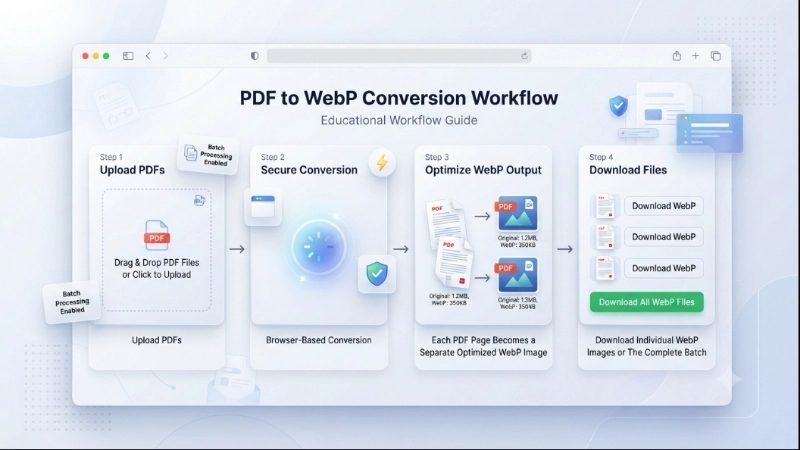
How to Convert PDF to WebP in 4 Simple Steps
Step 1: Click the upload area and select your PDF files (you can select multiple).
Step 2: Click "Convert PDF to WebP". Your browser processes each page – watch the magic happen.
Step 3: Preview each WebP image right in your browser. Check quality, see file sizes.
Step 4: Download individual WebP files or click "Download All WebP Files" to get them all at once.
Pro tip: Use our image compressor if you need even smaller files afterward.
Tips for Best Results
• Original is best: Always convert from the original PDF, not a scanned copy.
• WebP vs JPG: For websites, choose WebP. For maximum compatibility, use our PDF to JPG tool.
• Batch download: After converting 20+ pages, click "Download All" and let them download while you work.
• File names: Files are named like "yourpdf_page1.webp" – easy to organize later.
Frequently Asked Questions About PDF to WebP Conversion
⚡ Image Optimizer – more free tools You Might Need
Check these other free Quickly your photos, pictures – most popular tools all private, no upload
📖 Helpful Articles From read our Blog
How to Convert PDF to WebP: The Complete Beginner’s Guide for 2026
It makes images smaller without losing quality. That means your website loads faster and makes visitors happy. This guide will show you everything about how to convert PDF to WebP easily and for free. I’ll cover the “why,” the “how,” and give you the best tools to do it.👉Read more ?
Best Passport Photo Maker Tools for Students and Job Applications
That experience changed everything for me. Today, I want to share the best passport photo maker tools I have found. Whether you are a student applying for college, a professional updating your LinkedIn profile, or someone applying for a visa, these tools will save you time and money.👉Read more ?
Facebook Image Size for Posts: The Complete Guide for 2026
Today, I am going to break down everything you need to know about facebook image size for posts. No confusing jargon. No technical overload. Just clear answers and practical tips.👉Read more ?