
🔄 Rotate Image Online – Free Photo Rotator Tool
image rotator • rotate image online • batch image rotate • picture rotator online
Fix sideways photos instantly. Rotate picture in bulk – 20, 30, even 50 at once. Works for JPG, PNG, WEBP, AVIF. 100% private, no upload.
Upload Images (0)
🔒 Your privacy matters – real talk
No upload, no storage. Unlike other online pic rotate tools that ask for your files, this one works completely in your browser. Your rotated pictures never leave your device. I built it this way because I value my own privacy.
Image rotation – simple explanation
What Is a Rotate Image?
Imagine holding a printed photo in your hand. When you turn it clockwise or counter‑clockwise, that's exactly what rotate image means digitally – changing its orientation from landscape to portrait or fixing a sideways photo.
When you rotate picture using this tool, the computer mathematically recalculates every pixel's position. A good image rotator keeps your quality perfectly intact – no blur, no artifacts.
Whether you're fixing a vacation selfie or preparing product images for your website, my batch image rotate tool handles 50 at once with the exact same quality.
How Image Rotator Works (No Geek Speak)
Every image is made of tiny dots called pixels. When you rotate photo online, your browser takes that grid and maps each pixel to its new spot. For 90° or 270°, rows become columns. For 180°, it's simply flipping upside down.
Modern browsers have a built‑in Canvas – like a digital whiteboard that redraws your image in milliseconds. When you use my free rotate image online tool, I'm telling Canvas: "take this picture, turn it X degrees, show me." Because everything stays in your browser, it's lightning fast – even for 20 photos.
The rotated file saves in its original format – JPG stays JPG, PNG stays PNG. No extra compression, no quality loss.
Why I built this free image rotator (and why you'll love it)
Hey, I'm Naresh – creator of TopImageFixer. A couple years ago, I was running a small online shop selling handmade pottery. Every week I'd photograph 30–40 new pieces. But my phone camera often saved pictures sideways. I'd have to open each photo in an editor, rotate picture, save, repeat. Took me an hour every single week.
I searched for a batch image rotate tool. Found a few, but they either uploaded my product photos to their servers or limited me to 5 images. So I built my own. It runs entirely in your browser – no upload, no limits, free forever.
Now my neighbour, a wedding photographer, uses it too. She gets hundreds of photos from a single wedding, and many need a quick rotate photo online fix. She drags them all in, picks 90°, and in seconds they're ready. Saves her about two hours per wedding.
Need to resize images after rotating? Check our free JPG Compress. Want to protect your work with a logo? We've got a Black White Image too. All private, no upload.
– Naresh, creator of Bulk Image Rotation Tool
How to rotate picture online free in 4 steps
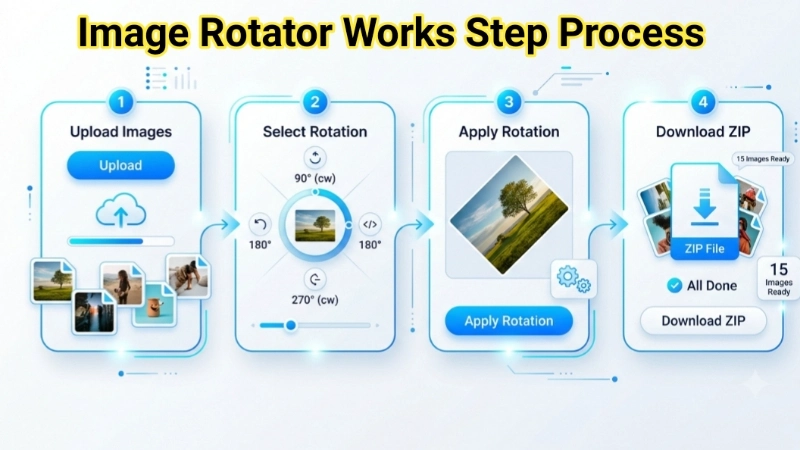
Step 1: Click the upload area and select your photos (mix formats allowed).
Step 2: Choose a preset angle (90°, 180°, 270°) or switch to custom angle (0‑360°).
Step 3: Hit "Apply Rotation" – your browser does all the work locally.
Step 4: Download each image individually or click "Download All Images (Direct)" to get them all at once.
Need to batch rotate images regularly? Bookmark this page – I keep it open in a tab.
Frequently Asked Questions (FAQ) - Image Rotation
⚡ Image Optimizer – more free tools You Might Need
Check these other free Quickly your photos, pictures – most popular tools all private, no upload
📖 Helpful Articles From read our Blog
The Complete Beginner’s Guide on How to Rotate Image Without Any Hassle
Don’t worry. This happens to all of us. The good news is that figuring out how to rotate image files is one of the easiest photo fixes you can make. You don’t need to be a tech expert or a professional designer..👉Read more ?
Best Image Compression Tools for Bloggers and Website Owners
I will share with you the best image compression tools I have personally used and tested. Whether you are a blogger, a website owner, or someone who just wants faster loading pages, this guide is for you.👉Read more ?
Rotate Photo Online: The Easiest Way to Fix Your Image Orientation
In this article, I’ll walk you through everything you need to know about how to rotate photo online – for free, without any technical skills. I’ll share practical tips, show you what to look for in a good tool, and help you understand when simple rotation isn’t enough.👉Read more ?