
📄 PDF Convert to PNG File - Convert PDF Files to PNG Images Online
convert pdf to png file • convert pdf to png online • pdf to png file • bulk pdf to png
Convert pdf to png for free instantly with transparency support. Each PDF page converts to a separate PNG image. Download individual PNGs or all images at once without ZIP compression!
Upload PDF Files (0)
Each PDF page converts to separate PNG with transparency🔒 Your privacy matters
We do not store any PDFs. All conversions run directly in your browser (client‑side). No upload, no tracking, no cookies. Your files never leave your device. This is what makes our pdf to png converter different from others.
What Is a PDF to PNG Converter?
A PDF to PNG converter does exactly what it sounds like: it takes your PDF file and turns each page into a separate PNG image. Think of it like taking a perfect screenshot of every page, but way better quality and without any fuzziness. The PNG format is special because it keeps everything crisp – text stays sharp, lines stay clean, and here's the best part – it supports transparency. So if your PDF has a logo floating on a transparent background, that PNG will keep it transparent.
I built this converter because I got tired of emailing PDFs to clients who'd write back "can you send this as an image? I just want to see it quickly." Now I drag the PDF here, click convert, and boom – each page is a PNG. The tool runs right in your browser – nothing gets uploaded to some random server. Your PDFs stay on your computer the whole time. Whether you're a teacher sharing lesson slides, a business owner sending invoices, or just someone trying to turn a document into something you can post on social media – this pdf to image tool is for you.
Why Convert PDF File to PNG?
Let me give you a real example from my own life. I run a small online shop selling digital products. Customers always want to see what they're buying before they pay. Sending them a whole PDF feels clunky – they have to download it, open it in another app, flip through pages. But when I send PNGs? They see the images right in their browser, on their phone, in their messages. No extra steps.
Here's another one: my cousin teaches at a school, and she needed to put her lesson materials on the class website. The site didn't accept PDF uploads – only images. She used this tool, turned her 10-page lesson into 10 PNGs, and uploaded them in minutes. The students could view each page right in their browser, zoom in on text, and even save them to their phones.
And PNG specifically? That transparency thing is huge. If you've got a logo, a diagram, or any graphic that needs to sit on different backgrounds, PNG keeps those edges clean. No white boxes, no awkward backgrounds – just your content floating wherever you put it.
Why I built this PDF to PNG converter (and why I keep it free)
Hey, I'm Naresh – a small business owner and part-time coder. I used to struggle with sending PDF contracts to clients. They'd ask, "Can you send this as an image so I can preview it on my phone?" I'd take screenshots, crop them, and email – such a hassle. Then I thought: why not build a tool that turns each PDF page into a PNG instantly? That's how this pdf to png converter online was born.
So I built this one night. It works entirely in your browser – your PDFs never leave your computer. Now I use it for my own business: convert invoices to PNG for quick sharing, extract diagrams from PDFs, and create image previews. My neighbor who's a teacher uses it to convert lesson plans to images for her students. It's simple, private, and actually works.
– Naresh, creator of TopImageFixer (PDF to PNG Converter)
How to convert PDF to PNG without uploading
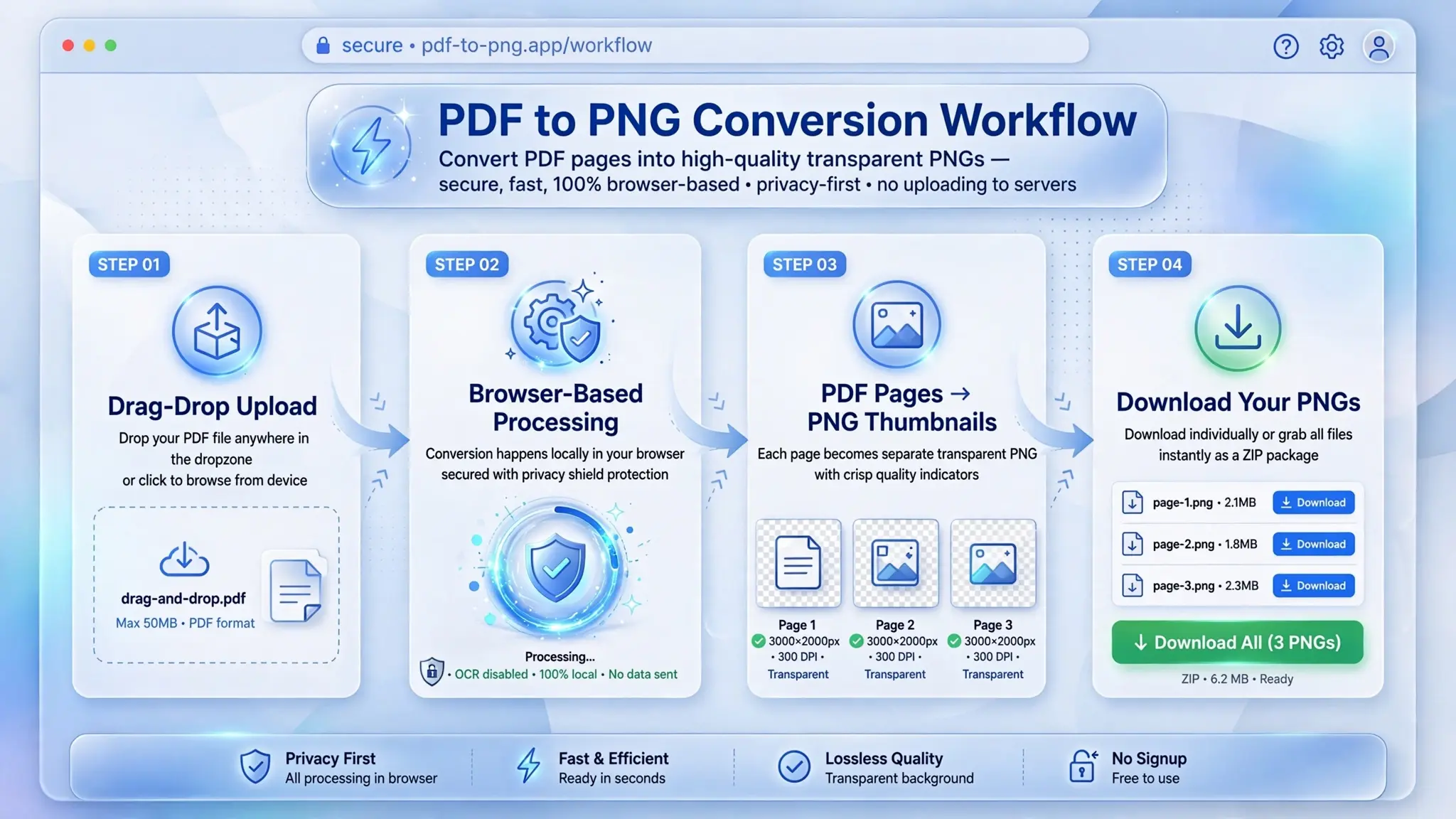
Step 1: Click the upload area and select your PDF files (you can choose multiple).
Step 2: Review the selected files – we'll show you how many PDFs you've chosen.
Step 3: Hit "Convert PDF to PNG". Your browser converts every page from every PDF.
Step 4: Done! Each PNG appears with its own download button. For batch, click "Download All PNG Files" – each file downloads separately (no ZIP).
Pro tip: PNG supports transparency – perfect for logos, diagrams, and text-heavy pages.
Tips for best PDF to PNG conversion
• Multi-page PDFs become multiple PNGs – one per page. Great for brochures, presentations, ebooks.
• Transparency works: if your PDF has transparent elements (like logos), they'll stay transparent in PNG.
• Quality is preserved: we use high resolution (scale=2) for crisp PNGs.
• Batch download: click "Download All PNG Files" and each PNG downloads separately – no ZIP, ready to use.
PDF vs PNG – What's the Difference?
PDF (Portable Document Format) was created to be the final version of a document – like a digital printout. It locks in fonts, layout, images, everything so that no matter what device you open it on, it looks exactly the same. PDFs can hold multiple pages, they can have clickable links, form fields, and they're great for printing.
PNG (Portable Network Graphics) is an image format, pure and simple. It was designed for the web – to show pictures, logos, screenshots. What makes PNG special is lossless compression (no quality loss) and transparency. That's huge. When you have a logo that needs to sit on different colored backgrounds, PNG keeps those edges clean with no white box around it.
Which one should you use? If you're sharing a document for someone to read quickly, PNG wins. If you need to preserve exact formatting for printing or professional delivery, stick with PDF. But with this tool, you don't have to choose – you can have both.
When should you use a PDF to PNG converter?
Social media: Share PDF pages as images on Instagram, Facebook, Pinterest.
Presentations: Extract slides as PNGs for quick previews.
E-commerce: Show product PDF brochures as images on your store.
Education: Teachers convert lesson plans to PNG for students.
Archiving: Save important documents as PNG images for easy viewing.
Frequently asked questions (PDF to PNG)
Is It Safe to Convert PDF to PNG Online?
This is the number one question I get, and here's the honest truth. Most online converters upload your file to their server – your document sits on someone else's computer. I never liked that. That's why I built this tool differently.
Everything happens right inside your browser. When you select your PDF, it stays on your device. The conversion code runs on your computer, using your processing power. Nothing gets uploaded to any server. Not to mine, not to anyone's. I literally cannot see your files.
So is it safe? Yes, because "online" in this case is a bit misleading. You're online to load the webpage, but after that, your files never leave your device. No upload, no server, no copy. Just your computer doing the work. That's the level of privacy I wanted for myself.
⚡ Image Optimizer – more free tools You Might Need
Check these other free Quickly your photos, pictures – most popular tools all private, no upload
📖 Helpful Articles From read our Blog
The Ultimate Guide to Online PDF to PNG Converter: Free, Fast, and Effortless
In this guide, I will walk you through everything you need to know about converting PDF to PNG online. From why you need it, how to do it, and which tool is the best for the job. By the end, you will be a pro at turning PDFs into crisp, clear PNG images.👉Read more ?
How to Convert a PDF File to PNG: The Complete Beginner’s Guide
In this complete guide, I’ll show you how to convert a PDF to a PNG file using different methods. I’ll cover everything from free online tools to built-in options on your computer. By the end, you’ll be able to turn any PDF into PNG images with confidence.👉Read more ?
How to Resize Images for Online Forms and Documents
Today, I will share everything I learned. Whether you are applying for a job, filling out a college application, or submitting government forms, this guide will help you get your images to the right size every time.👉Read more ?