
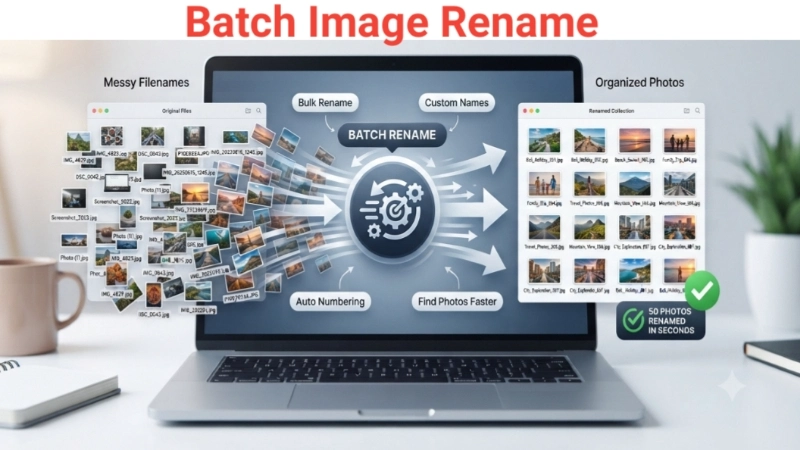
We’ve all been there, right? You’ve just come back from a trip with your camera or phone full of photos, transfer them to your computer, and find a chaotic mess of filenames like IMG_20230615_1245.jpg, DSC_0042.jpg, and P1000234.JPG. Finding a specific picture among hundreds feels like looking for a needle in a haystack. Or maybe you’re a content creator drowning in screenshot-2023-... files.
I remember once spending almost an hour manually renaming 100 photos for a project. It was boring and a total waste of time. What if I told you there’s a way to rename all of them in one go? That’s where the magic of batch image rename comes in.
What Exactly is Batch Image Rename?
In simple terms, batch image rename means renaming multiple image files simultaneously using a single set of rules. Instead of manually changing Photo (1).jpg to Sunset_01.jpg, Photo (2).jpg to Sunset_02.jpg, and so on for every single file, you use a tool to do it all at once. Whether you search for batch photo rename, bulk rename photos, or bulk rename pictures, they all mean the same thing: a smarter way to organize your files.
Think of it like this: you’re teaching your computer a simple rule, and it applies that rule to all the photos you selected in a fraction of a second.
Why Bother with Bulk Renaming? The Real Benefits
You might be thinking, “My filenames are fine the way they are.” Trust me, organized filenames make a huge difference. Here’s why you should consider it:
- Find Your Photos in an Instant: Imagine being able to type
"Bali Holiday 2023"into your search bar and instantly seeing all your photos from that trip, instead of trying to remember file names. This is the power of a good naming system. - Say Goodbye to Filename Chaos: A uniform naming structure makes your folders look professional and clean. It takes the guesswork out of what a file contains. For example, the name
logo_final_blue.pngis much more helpful thanasdf1234.png. - Save a Ton of Time: This is the biggest advantage. If you have 300 or even 1,000 images, bulk renaming is a lifesaver that saves you from hours of repetitive, manual work.
- Boost Your SEO: If you’re a blogger, e-commerce store owner, or anyone who uploads images online, descriptive filenames are great for search engines. An image named
"blue-running-shoes.jpg"tells a search engine what the image is about, helping your site rank better. - Simplify Sharing and Backups: When you share a folder of photos, a consistent naming scheme makes it easier for others to understand the content. It also prevents filename conflicts when you merge different folders.
How Does a Batch Image Renamer Work? A Quick Look
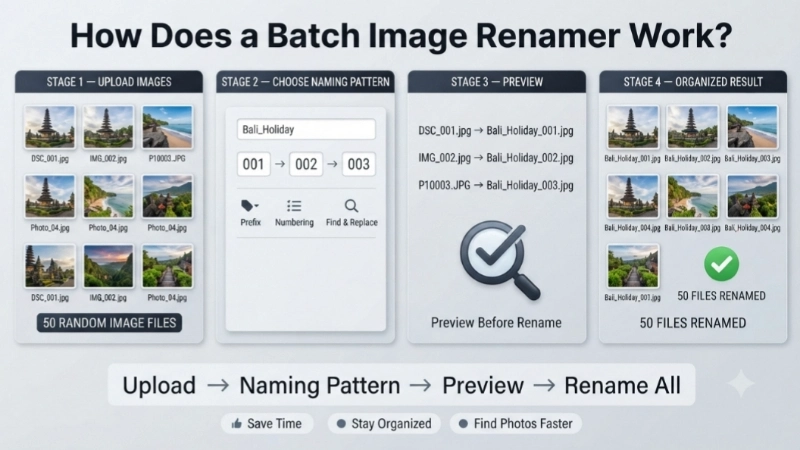
Most bulk rename tools, especially online ones, follow a simple, user-friendly process. You don’t need to be a tech wizard to use them. The standard steps are:
- Upload Your Images: You select the photos you want to rename, often by dragging and dropping them into a box on the screen. The tool supports common formats like JPG, PNG, JPEG, and WebP .
- Choose Your Naming Pattern: This is where you get creative. You tell the tool how you want your new filenames to look. Common options include:
- Adding a Prefix/Suffix: For example, add “Trip_” to the beginning of all filenames.
- Sequential Numbering: Add a number like
_001,_002, etc. to each file . - Using a Custom Name: You write the base name, and the tool adds the numbers.
- Find and Replace: Replace a word in the current filenames with another word .
- Preview Before You Finalize: The best tools show you a preview of how your filenames will look after the change. This lets you double-check your settings and avoid mistakes .
- Download Your Renamed Photos: Once you’re happy with the preview, you click the “Rename” button. The tool processes your images instantly, and you can download them, usually as a single zip file.
Smart Bulk Renamer Features: You’re in Control
Modern batch image rename tools are more than just “one-click wonders.” They offer features that give you granular control, making the process super flexible .
Custom Naming Patterns
- Auto-Numbering: You can often set the starting number, step, and padding (like 001, 002 or 01, 02). For instance, if you have photos from three different events, you can start each batch at “1” again .
- Add Dates: Some tools can use the metadata from your images (like the date taken) to add the date to the filename. This is incredibly handy for organizing by the time of the event .
- Text Replacement: Easily clean up messy names. For example, replace “IMG_” with “Holiday_” across all your files instantly.
More Than Just Renaming
Some advanced tools combine renaming with other image editing features. Imagine being able to batch rename photos and also resize them or convert them to a different format all at the same time . It’s like having a mini-image processing center in your browser.
Who is Batch Image Rename For? (Spoiler: Almost Everyone)
This tool is incredibly versatile. Here are a few examples of who can benefit:
- For Photographers: After a photoshoot, you can quickly rename hundreds of RAW images with your client’s name and the date. For example,
"Smith_Family_001.nef". - For Designers: Keep all your design assets organized. Rename files by project, version, or type so you never lose track of client deliverables.
- For Students and Professionals: When you’re dealing with reports, scanned documents, or presentation images, bulk image rename helps you maintain clarity. No more confusing file names scattered across folders .
- For E-commerce Sellers: Rename product images to something search-engine friendly like
"men-blue-jeans-front.jpg"instead of"product_12345.jpg". - For Organizing Personal Memories: Easily name your holiday photos like
"Italy_2023_Colosseum_001.jpg"so you can quickly relive your favorite memories.
Rename Images in Bulk: A Simple Step-by-Step Example
Let’s say you have 50 photos from a wedding and you want to rename them to have a common base name. Here’s a practical example of how you’d do it using a typical online bulk photo renamer.
| Step | Action | What You See |
|---|---|---|
| 1 | Upload your photos. You can drag and drop all 50 photos into the tool. | It shows you a list of the files, maybe like DSC_001.jpg, DSC_002.jpg, etc. |
| 2 | Enter your custom name. In the “Pattern” field, you type something like Wedding and choose the “Numbering” option. | You see a preview: Wedding_001.jpg, Wedding_002.jpg… |
| 3 | Adjust settings. You want the numbering to start from “01”, and you want a separator like a dash “-“. | Preview updates: Wedding-001.jpg, Wedding-002.jpg… . |
| 4 | Click “Rename”. The tool processes the 50 images, which usually takes just a second or two. | All files are renamed, and you can download them. |
Bulk Rename Photos: Tips and Best Practices for an Organized Life
To make the most of your bulk rename pictures workflow, keep these helpful tips in mind :
- Always Backup First: This is the golden rule. Before you do any bulk operation, copy your images to a separate folder. This way, if you make a mistake, your originals are safe and sound.
- Plan Your Naming Convention: Think about what’s most important to you: the date? The event? The location? A good pattern might be:
Year-Month-Day_Event_Number. - Use a Consistent Separator: Avoid spaces and special characters, as they can sometimes cause issues with websites or software. Use underscores (
_) or hyphens (-) instead. - Keep it Descriptive but Not Too Long: A name like
beach-sunset_001.jpgis great. A super long name likemy-amazing-beach-vacation-sunset-picture-number-one.jpgis a bit much and hard to read. - Preview Before Applying: This is your chance to catch any mistakes. Always check the preview before you finalize the rename.
How to Get Started: Try a Free Online Bulk Renamer
The easiest way to start is by using a free online tool. They are perfect for beginners and work on any device. I often recommend people to visit Top Image Fixer and check out their Image Renamer tool. It’s completely free and incredibly easy to use, allowing you to batch image rename without signing up or installing anything.
You can try it out right here: [Top Image Fixer – Free Image Renamer Tool] (Insert your internal link here). You can rename all your images directly in your browser. No downloads, no sign-ups, just a simple, fast, and free solution.
Choosing the Right Tool: Online vs. Software
If you decide you need more than a quick online fix, there are also dedicated software programs. Here’s a quick comparison to help you choose:
| Feature | Online Bulk Renamer (e.g., Top Image Fixer) | Desktop Software (e.g., Bulk Rename Utility) |
|---|---|---|
| Installation | None, works in browser | Requires download and install |
| Ease of Use | Very beginner-friendly, simple interface | Can be complex with advanced options |
| File Limits | May have limits, but many are generous | Usually unlimited, dependent on your PC’s power |
| Features | Core features: naming, numbering, replacing | Advanced features: regex, metadata editing, EXIF data |
| Price | Mostly free | Freemium or paid |
Frequently Asked Questions (FAQs)
1. Is batch image rename safe? Will I lose my photos?
Yes, it’s perfectly safe, especially when you use a reliable tool. The best online tools process your files in your browser, which means they never actually get uploaded to a server. Your privacy and security are maintained. As a safety net, it’s always smart to keep a backup of your original images .
2. What is the difference between ‘batch image rename’ and ‘bulk rename photos’?
Absolutely nothing! These are just different ways of saying the same thing. You might also hear batch photo rename, bulk rename pictures, or mass file renamer. They all refer to the process of renaming multiple files at once .
3. Can I undo a bulk rename operation?
This depends on the tool. Some desktop programs allow you to undo a rename operation . Web-based tools generally don’t, but they don’t modify your original files. This is why previewing and backing up are so important.
4. Does batch renaming affect the quality or metadata of my photos?
No. When you rename images in bulk, you are only changing the file name. The actual image data, quality, and EXIF metadata (like camera settings, date taken, and GPS coordinates) remain completely untouched .
Final Thoughts: Take Control of Your Messy Folders Today
Staring at a folder full of confusing filenames can be a real headache. It creates mental clutter and makes your digital life harder than it needs to be. Batch image rename is the perfect solution to bring order to the chaos. It’s a simple, powerful, and incredibly practical workflow that anyone can master.
By using a batch photo rename tool, you’re not just saving time; you’re building a system that makes finding, managing, and sharing your photos a breeze. It’s a small step that provides huge benefits, whether you’re a professional or just someone who wants to organize their family memories.
So, why wait? Go ahead, find that folder full of random numbers, and give it a try. You’ll be amazed at how satisfying it is to see all your photos lined up with perfect, clean names. Start with a few test photos to get the hang of it, and then go ahead and bulk rename photos with confidence.
[Check out Top Image Fixer’s Free Image Renamer Tool here](Insert your link). It’s the easiest way to get started. And if you found this guide helpful, please feel free to share it with a friend who might also be drowning in messy file names!