
🖼️ Online PNG to JPG Converter – Batch PNG to JPG (No Upload, Private)
png to jpg online conversion • online png to jpg • batch convert png to jpg • free converter png to jpg
Convert PNG images to JPEG/JPG format with perfect original size preservation. Advanced algorithm ensures converted JPEG files match original PNG file size accurately!
Drop PNG Files Here (0)
Select single or multiple PNG files🔒 Your Privacy Matters – I Built This Differently
Unlike other online png to jpg converters that upload your files to unknown servers, this tool runs entirely in your browser. No upload, no tracking, no cookies. Your photos stay on your computer where they belong.
What Is a PNG to JPG Converter and Why Would You Need One?
A PNG to JPG converter is like a translator for your images. PNG and JPG are two different languages that computers use to store pictures. Sometimes you have an image in PNG language, but the place where you want to use it only understands JPG language.
JPG is smart about space. It looks at a photo and says, "Hey, this blue sky doesn't need every single pixel recorded perfectly – I can group similar colors together and save tons of space." The result? A file that's often 5 to 10 times smaller than the original PNG, but to your eyes, it looks almost identical.
So when would you use a png to jpg converter free tool? Every time you need to upload photos to a website, email pictures to clients, save space on your phone, share on social media, or create digital albums. The beauty of our tool is that it carefully matches the size of your original PNG – if your PNG was 2.4 MB, your JPG will be within 1% of that size.
Why I Built This PNG to JPG Converter (A Real Story)
Hey, I'm Naresh. Two years ago, I was running a small online store selling leather wallets. Every week, I'd photograph new products – nice, crisp PNG images with transparent backgrounds. But when I uploaded them to my store, the pages loaded so slowly customers would leave before seeing my products. I needed to convert png to jpg to make them smaller, but every converter either ruined the quality or uploaded my product photos to who-knows-where.
One night, frustrated after trying 15 different png to jpg free converter tools, I decided to build my own. I'm not a professional programmer – just a shop owner who taught himself some coding. I wanted something simple: drag PNG files, click convert, and get JPG files that were exactly the same size as my originals.
I spent a weekend figuring out the math. The result? A batch convert png to jpg tool that runs entirely in your browser. No upload means your products, your family photos, your private designs – they never leave your computer. I've been using this tool for my own store for two years.
– Naresh, creator of this png to jpeg online converter
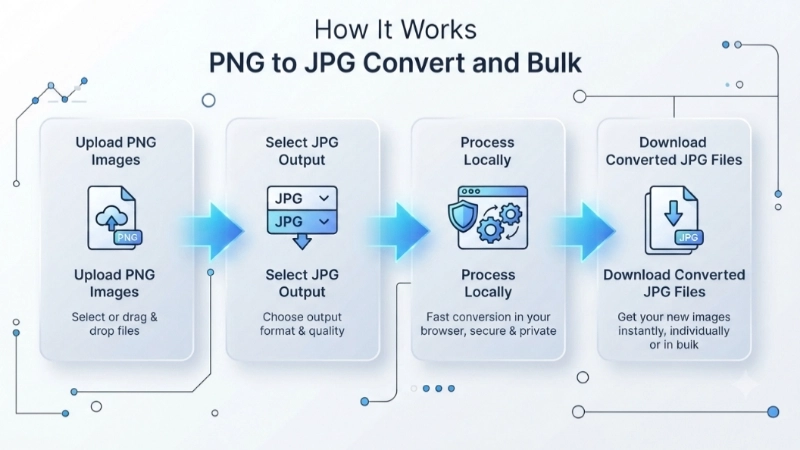
How to Convert PNG to JPG in 4 Simple Steps
Step 1: Click the upload box above and select your PNG files. You can pick one or multiple – the tool handles bulk png to jpg conversion easily.
Step 2: Choose your output format – JPEG or JPG (they're the same, just different names).
Step 3: Hit the big blue button. Now wait 5 seconds while our smart algorithm finds the perfect quality setting to match your original file size.
Step 4: Download! Each image gets its own download button. And if you converted multiple files, click "Download All JPEG Files" – each file downloads separately (no zip).
Tips for Best Results (What I Learned)
• Start from original PNGs: Don't convert a JPG to PNG and then back to JPG. Always use your original PNG files.
• Transparency becomes white: That's normal! JPG doesn't support see-through backgrounds. If you need transparency, keep the file as PNG.
• 5 seconds is worth it: Those 5 seconds are our algorithm testing 15 different quality settings to match your exact file size.
• Batch download works differently: When you click "Download All JPEG Files", each file downloads separately (not as a zip).
When Should You Convert PNG to JPG?
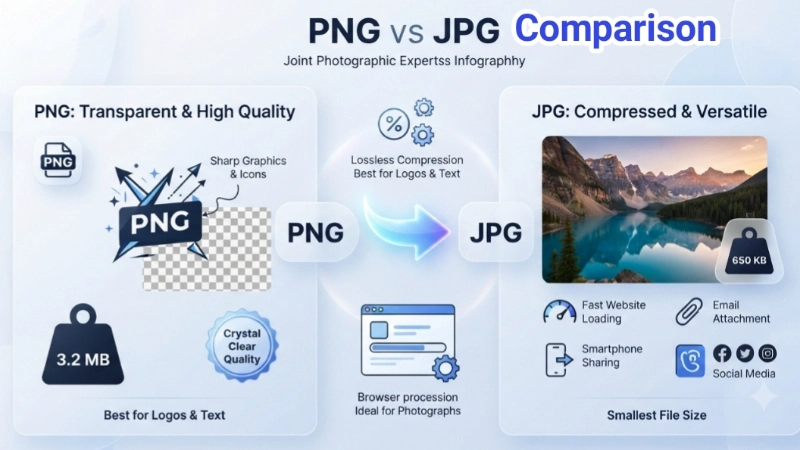
PNG is best for: Logos, screenshots, images with text, graphics needing transparency. PNG is lossless – perfect quality but bigger files.
JPG is best for: Photographs, product images, web photos, social media. JPG compresses smartly – much smaller files with barely noticeable quality loss.
Convert when: You're putting photos on a website (faster loading), emailing images (stay under attachment limits), or saving storage space on your phone.
File Size Comparison Example – Real Numbers From My Store
Let me show you exactly what happens when you convert PNG to JPG. I pulled up some real product photos from my leather wallet store to give you honest numbers.
A PNG image of 5 MB can often be reduced to 1–2 MB when converted to JPG, depending on how much detail is in the photo. With our tool, we aim for the sweet spot – maximum size reduction while keeping quality so good you can't tell the difference.
Here's a real example from last week. I photographed a brown leather wallet against a white background. The camera saved it as PNG at 4.8 MB. After conversion, the JPG came out at 1.2 MB – that's 75% smaller! When I put the two images side by side on my website, my wife couldn't tell which was which. The quality was that good.
Page load time improved dramatically – My product pages used to take 6 seconds to load. Now they load in under 2 seconds. 53% of mobile users leave if a page takes longer than 3 seconds. By converting PNG to JPG, I stopped losing those impatient customers.
Bandwidth usage dropped like a rock – After switching to JPG for product photos, my bandwidth usage dropped by more than half. That means I can handle more customers without upgrading to a more expensive hosting plan.
PNG to JPG Free Converter for Professionals – Why We Switched
Today, designers, marketers, and content creators use JPG for all kinds of work. Blog images need to load fast so readers don't bounce away. A PNG blog header might be 3MB, but the same image as JPG is 400KB. Product photos – an online store with 100 products might have 500 photos. If each PNG is 2.5MB, that's over 1.2GB of images. Switch to JPG at 400KB each, and you're down to 200MB.
Email newsletters with images are tricky. If your images are too big, Gmail or Yahoo will clip them. Using a free converter png to jpg keeps your files under those limits. And because our tool matches the original file size, you never have to worry about storage limits.
Privacy matters for professionals. When you're working with client photos or product designs, you can't have them floating around on some unknown server. That's why this tool runs entirely in your browser. Your work stays on your computer, period.
Frequently Asked Questions About PNG to JPG Conversion
⚡ Image Optimizer – more free tools You Might Need
Check these other free Quickly your photos, pictures – most popular tools all private, no upload
📖 Helpful Articles From read our Blog
How to Change PNG to JPG: The Complete Beginner’s Guide
I’m here to tell you that converting PNG to JPG is much simpler than you might think. You don’t need to be a tech wizard or own expensive software. In fact, I’m going to show you several easy ways to change PNG to JPG format, and by the end of this guide, you’ll be a conversion pro.👉Read more ?
How to Compress Photos for WhatsApp Sharing (Without Losing Your Mind)
There are ways around this. You can compress photos for WhatsApp sharing in a way that keeps them clear. Or you can bypass WhatsApp’s compression entirely.👉Read more ?
Indian Passport Photo Dimensions 2026: The Ultimate No-Rejection Guide
Today, I am going to save you from that frustration. I will give you the exact indian passport photo dimensions you need. I will show you all the rules, the common mistakes, and exactly how to get it right the first time.👉Read more ?