
⚫ Make Image Black and White – Converting Color Photos to Black and White
image into black and white • change picture to black and white • bulk black white image
Transform photos to stunning black and white with RGB channel control. Batch convert JPG, PNG, WEBP, AVIF – all private, no upload.
Upload Images (0)
🔒 Your Privacy – No Upload, No Servers
Your photos never leave your device. Unlike other online tools that upload your images to unknown servers, everything runs in your browser. No tracking, no storage. Just pure client-side processing.
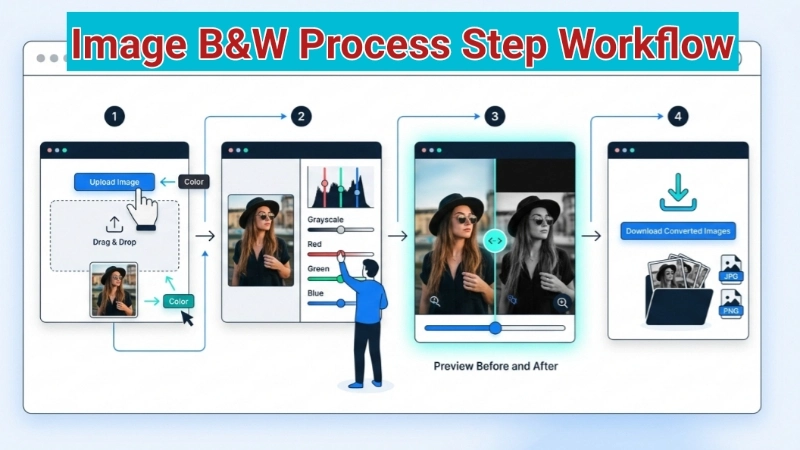
How to convert images to black and white (with RGB control)
Step 1: Click upload and select your photos – works with JPG, PNG, WEBP, AVIF, even SVG and BMP.
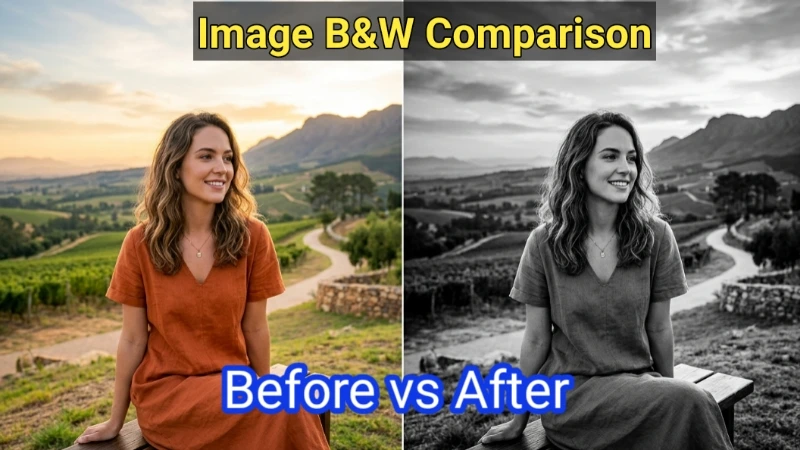
Step 2: Set grayscale to 100% for pure B&W. Lower values create cool desaturated effects.
Step 3: Play with RGB sliders. For portraits, try Red +20, Green +10. For landscapes, Green +30, Blue +20.
Step 4: Click "Convert to Black & White". Your browser does all the work – nothing uploads.
Step 5: Download individually or hit "Download All" for batch. Files save with "_bw" added.
Real ways people use this tool
E‑commerce sellers
B&W versions create artistic brand feel. I batch convert 20 photos in seconds.
Photographers
Create B&W proofs with RGB control. The red slider saves hours in Photoshop.
Real estate
Convert property photos for luxury brochures. Makes architecture look timeless.
Mastering RGB sliders – from a photographer friend
Think of RGB sliders as colored filters. Here's what they do:
- Red +: Brightens skin tones, red flowers. Great for portraits.
- Red –: Darkens red areas – adds drama.
- Green +: Brightens foliage, grass. Essential for landscapes.
- Blue +: Makes skies and water lighter, airy feel.
- Blue –: Darkens skies – creates dramatic, stormy effects.
Experiment! There's no "wrong" setting. For my pottery, I use Red +30, Green +10. For portraits, try Red +20, Green +5, Blue -10 for classic film look.
Frequently Asked Questions (FAQ) - Black & White Image
Why I built this tool – and why you'll love using it
⚡ Image Optimizer – more free tools You Might Need
Check these other free Quickly your photos, pictures – most popular tools all private, no upload
📖 Helpful Articles From read our Blog
How to Make a Picture Black and White: The Complete Beginner’s Guide
I will share the secrets that professional photographers use. So grab a photo that you want to transform. Let me walk you through this step by step. You will be amazed at how easy this is..👉Read more ?
Convert Image to Black and White: The Art of Making Your Photos Timeless
I will show you exactly how to convert image to black and white using multiple methods. We will also look at how to convert picture on your phone, computer, and using free online tools. and without making them look flat or boring.👉Read more ?
WebP vs JPG File Size Comparison: Which One Saves More Space?
Is WebP really better than JPG? How much space can I actually save? And most importantly, will I lose quality? I will answer all these questions. I will show you a clear webp vs jpg file size comparison so you can decide once and for all which format wins.👉Read more ?
All formats work – same format output
Upload any format, get converted images in the exact same format. No forced conversion, no quality loss.