
🖼️ Online JPG to PNG Convert – JPG to PNG Converter Free and Multiple
converting jpg into png • image converter jpeg to png • multiple jpg to png • jpg to png free
Convert JPEG/JPG images to PNG format with high quality preservation. PNG supports transparency and lossless compression!
Upload JPG/JPEG Files (0)
Multiple files supported – batch convert🔒 Your privacy matters – Your Images Never Leave Your Device
Unlike other converters that upload your photos to their servers, this tool works entirely in your browser. No upload, no tracking, no storage. Your private images stay private – always.
No Server Upload
Your images never leave your computer. 100% client-side conversion means complete privacy.
Fast Conversion
Converts instantly in your browser. No waiting for uploads or downloads from servers.
High Quality Output
Lossless PNG conversion preserves every pixel. Perfect for logos, screenshots, and graphics.
Bulk Convert
Convert multiple JPG files to PNG at once. Save time with batch processing.
What Is a JPG to PNG Converter and Why Would You Need One?
Let me explain this in simple terms – when I first started working with images, I had no idea why someone would want to change a perfectly good JPG into a PNG. Here's the thing: JPG and PNG are like two different tools in a toolbox. A JPG is great for photographs – it makes files small by gently removing some image details you probably won't notice. But a PNG is like a perfectionist – it keeps every single pixel exactly as it is, no shortcuts.
So when would you need a JPG to PNG converter? I'll give you real examples from my own life. When I'm designing a logo for my pottery shop, I need the background to be transparent so it looks good on any color website. JPG can't do transparency – it always adds a white box. PNG handles transparency like a champ. Or when my cousin sends me screenshots of textbook pages, JPG makes the text look fuzzy, but PNG keeps every letter crystal clear.
Another reason people use a jpg to png converter online is for editing. If you plan to open an image in Photoshop or Canva and make changes later, PNG is your friend. Every time you save a JPG, it loses a tiny bit of quality – like making a photocopy of a photocopy. PNG stays perfect forever. So whether you're a business owner like me, a student, or just someone who cares about image quality, understanding when to convert JPG to PNG makes a huge difference.
Why I Built This JPG to PNG Converter
Hey, I'm Naresh – I run a small online shop selling handmade pottery, and I also do some freelance graphic design on the side. A few years ago, I was struggling with a simple problem: I had hundreds of product photos in JPG format, but I needed them as PNG for my website because PNG handles transparency better. I tried every "free" converter I could find online.
You know what happened? Every single one uploaded my product images to their servers. I had no idea where my photos were going or who could see them. Some tools had watermarks, some limited how many I could convert, and others just felt sketchy. One night, after uploading a batch of new product photos to some random website, I thought – why can't I just do this in my own browser?
So I stayed up late and built this tool. It took me a few weekends to get it right, but now I use it every week for my own work. My neighbor, who's a photographer, uses it to prepare proofs for clients. My cousin, a college student, uses it for his presentations. And the best part? None of our photos ever leave our computers.
– Naresh, creator of TopImageFixer
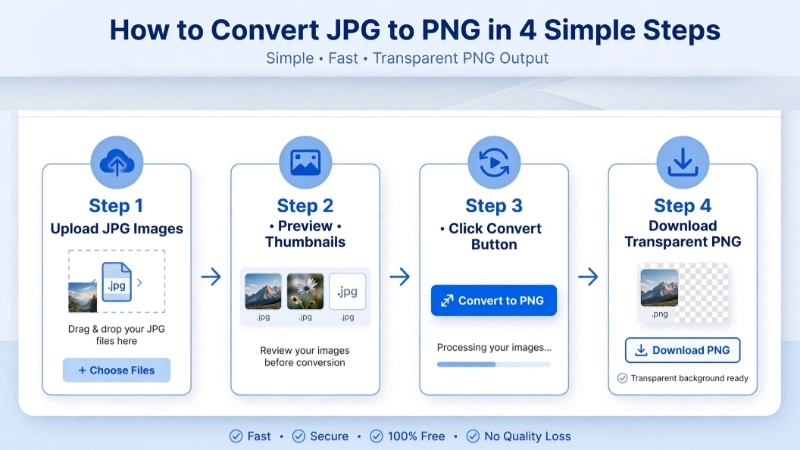
How to Convert JPG to PNG in 4 Simple Steps
Step 1: Click the upload area above and select your JPG/JPEG files. You can select multiple files at once – hold Ctrl (or Cmd on Mac) while clicking.
Step 2: Wait for the preview thumbnails to appear. You'll see each image with its filename and size.
Step 3: Click the blue "Convert JPG to PNG" button. Your browser will process each image – this takes a few seconds depending on how many files you have.
Step 4: After conversion, you'll see each PNG image with its own download button. Click individual buttons to save, or click the green "Download All PNG Files" button to download everything at once (each file downloads separately – no ZIP).
Pro tip: PNG files are usually larger than JPGs – that's normal. You're getting perfect quality and transparency support in exchange for file size.
When to Use JPG/JPEG and When to Use PNG
Use JPG/JPEG for: Photographs, social media, email attachments – when file size matters more than perfect quality.
Use PNG for: Logos with transparency, screenshots, images with sharp text, images you'll edit later – when quality matters most.
JPG vs WebP – Why WebP Is Better for the Web: WebP makes files about 30% smaller than JPG at the same quality level. For website photos, I'd actually recommend using our JPG to WebP converter instead. You get smaller files with great quality. Use PNG for logos and graphics with transparency, use WebP for website photos, use JPG for universal compatibility.
Why This JPG to PNG Converter is Different From Others
First and most important: your privacy. Almost every other converter uploads your images to their server. This tool runs entirely in your browser. Your images never leave your device. Not even for a millisecond.
Second: no limits, no games. I've used "free" converters that let you do five images and then ask for money. Or they add ugly watermarks. This tool has no limits. Convert 50 images at once. Do it every day. It's all free, always.
Third: it preserves quality the right way. This tool does exactly one thing: it takes your JPG and saves it as PNG. Same dimensions, same pixels, just a different format. The quality is identical to your original.
Fourth: batch download that actually makes sense. When you convert multiple files, you can download them all at once – each file downloads individually, with its original name. Simple human design.
Frequently Asked Questions (FAQ) – JPG to PNG Converter
⚡ Image Optimizer – more free tools You Might Need
Check these other free Quickly your photos, pictures – most popular tools all private, no upload
📖 Helpful Articles From read our Blog
JPG vs PNG: Which Image Format Is Better for Daily Use
Understanding JPG vs PNG is actually pretty simple once you know the basics. And by the end of this guide, you’ll never have to guess again. Whether you’re posting on social media, designing a website, or just saving family photos, I’ll show you exactly which format works best.👉Read more ?
How to Bulk Compress Images: Save Hours of Work in Just Minutes
No technical skills needed. No expensive software. Just simple steps that anyone can follow. By the end of this article, you will be compressing 100 photos in under 60 seconds. Yes, really. Let me show you how.👉Read more ?
JPG to PNG Converter Online: Why, When, and How to Make the Switch
I will show you everything about using a JPG to PNG converter online. We will look at why you might need a JPG file to PNG converter. And I will teach you how to use a JPG into PNG converter without losing your mind or your image quality.👉Read more ?