
📄 Converting a PDF File to a JPG – Make PDF of JPG and Secure, No Uplod
create pdf to jpg • batch convert pdf to jpg • turn pdf into a jpg • mass convert pdf to jpg
Turn any PDF into high‑quality JPEG images. Each page becomes a separate JPG. Private, no upload, works on phone & desktop.
Drag & Drop or Click to Upload PDF Files
Each page becomes a separate JPEG🔒 Your privacy matters – I built this for you
I built this tool because I hated uploading sensitive documents to random sites. Everything runs inside your browser. Your PDF never touches any server – it's just you and your computer. No tracking, no cookies, no hidden uploads.
What Is a PDF to JPG Converter?
A PDF to JPG converter takes your PDF document and turns each page into a JPG image. When you convert pdf file to image, you're essentially snapshotting every page. The result is a neat stack of .jpg files, one for each page. This makes it simple to share a single page on social media, pop it into a presentation, or just view it without needing a PDF reader. I designed this converter so you can do all that without uploading your files anywhere.
Why Convert PDF File to JPG?
1. Easy Image Sharing: JPGs are universal. Try uploading a PDF to Instagram – not gonna work. But a JPG? One click and it's there.
2. Quick Previews: Want to glance at one page without opening a PDF viewer? Convert to JPG and peek instantly.
3. Image Editing: Can't edit a PDF easily without special software. But JPGs? Any image editor works.
4. Website Optimization: Blog posts love images. Convert a PDF brochure page to JPG for a teaser image.
5. Compatibility: Some platforms don't accept PDFs but accept JPGs. That's when our pdf and jpg converter saves the day.
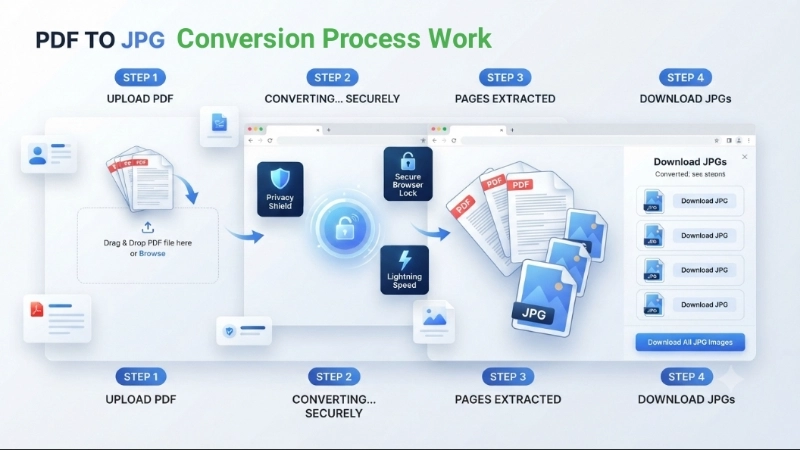
Why I built this – a real story
Hey, I'm Naresh. A few years ago I ran a small online coaching business. I had tons of PDF worksheets, ebooks, and student handouts. I often needed to change PDF file to JPG free so I could post previews on Instagram or insert pages into Google Slides. Every online converter I tried asked me to upload my files – which felt wrong because those PDFs contained student data and my unpublished content. I worried where they'd end up.
So one weekend I coded this tool. It uses the amazing PDF.js library and runs entirely in your browser. No upload, no backend. Just pure client‑side magic. I've been using it for my own work ever since. My neighbour, a photographer, uses it to convert pdf to picture format when clients send portfolios. My cousin, a teacher, does batch convert pdf to jpg for all her lesson plans at once.
– Naresh, creator of TopImageFixer (PDF to JPEG Converter)
PDF vs JPG – What's the Difference?
| Feature | JPG | |
|---|---|---|
| File Type | Document | Image |
| Multi-Page Support | Yes | No (Single Image) |
| Editable Text | Yes (with editor) | No |
| Web Friendly | Moderate | High |
| Best For | Documents, Printing | Visual Sharing, Web |
When you change format from pdf to jpg, you're taking a multi‑page document and turning each page into a shareable image. It's not about which is "better" – it's about what you need right now.
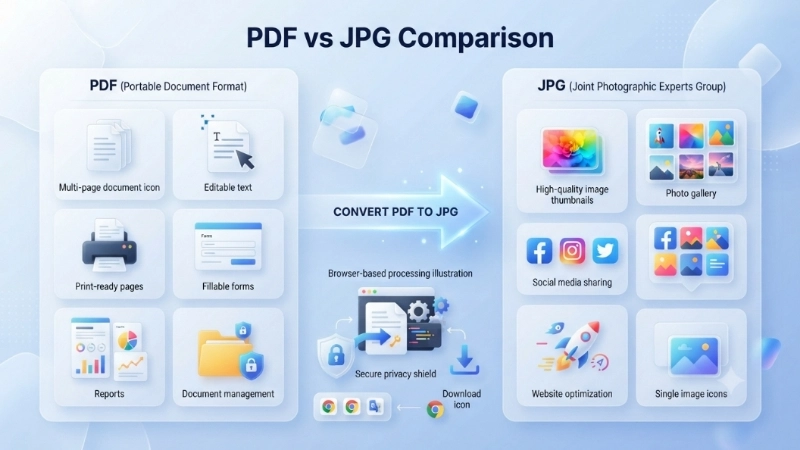
When to use JPEG vs PDF – and why converting helps
PDFs are great for printing and forms, but images are easier to share on WhatsApp, forums, or social media. If you need to convert pdf file to jpg free, you might want a single page as a picture. Another reason: some websites only accept JPG uploads. That's when our pdf to jpg jpeg converter free becomes a lifesaver.
Is It Safe to Convert PDF to JPG Online?
Absolutely. Let me give you the straight facts:
- Files are not uploaded to any server. The conversion happens in your browser.
- No file storage, no tracking. Once you close the tab, every trace is gone.
- It's 100% browser-based. You could disconnect from Wi-Fi after the page loads, and it would still work.
Free Online PDF to JPG File Converter – No Limits – Unlimited conversions, no account required, no watermarks. Available anytime.
Frequently Asked Questions About Converting PDF TO JPEG
⚡ Image Optimizer – more free tools You Might Need
Check these other free Quickly your photos, pictures – most popular tools all private, no upload
📖 Helpful Articles From read our Blog
How to Change File Format from PDF to JPG (Easy & Free Guide)
You can change file format from PDF to JPG in just a few minutes. There’s no need for expensive software or technical skills. Whether you want to change file type from PDF to JPG for one document or many pages, I’ll show you the easiest ways to do it.👉Read more ?
How to Convert PDF into a JPEG: The Complete Beginner’s Guide for 2026
This guide will walk you through all the best methods to convert a PDF into a JPEG, from fast online tools to built-in features on your computer. We will also show you how to do it for free and keep the quality looking great. Let’s dive in and learn how to convert PDF format to JPG like a pro.👉Read more ?
Best Ways to Reduce Image Size for Faster Website Loading
Fixing this is not complicated. You do not need to be a developer. You do not need expensive software. You just need to know a few simple tricks. Today, I am going to show you the best ways to reduce image size for faster website loading. 👉Read more ?