
📄 Bulk JPG to PDF - Convert JPG File into PDF File and Free Tool
jpg into pdf file • convert from jpg to pdf file • jpg to pdf file • jpg to pdf batch
Convert JPEG/JPG images to PDF format instantly. Each JPEG file converts to a separate PDF. Batch convert supported – no upload, 100% private.
Upload JPG/JPEG Images (0)
Each image converts to separate PDF – batch convert supported🔒 Your privacy matters – no upload and private
We do not store any images. All conversions run directly in your browser (client‑side). No upload, no tracking, no cookies. Your files never leave your device. When you use our free convert jpg to pdf tool, your photos stay with you.
What is a JPG to PDF converter?
A jpg to pdf converter is a tool that takes your JPG or JPEG images and turns them into PDF documents. Think of it like this: you have a photo on your phone (JPG), and you need to send it as a proper document (PDF). That's exactly what this tool does.
Why would you need to change format jpg to pdf? Lots of reasons. Schools and colleges often only accept assignments as PDFs. Government forms and applications usually want PDF documents. When you're applying for a passport or visa, they ask for photos in PDF format. Businesses share catalogs and invoices as PDFs because they look professional and print perfectly every time.
Our online converter to jpg to pdf is different from others you'll find. Most tools upload your photos to their servers – meaning strangers can see your private images. We built this to run entirely in your browser. When you convert image to pdf format with us, your photos never leave your computer. It's like having a private PDF printer built into your browser.
Whether you need to bulk convert jpg to pdf for work, photo convert to pdf file for school, or just want to free convert jpg to pdf for personal use – this tool does it all. No sign-up, no payment, no privacy worries. Just drag your images and click convert.
Why I built this JPG to PDF converter – a real story
Hey, I'm Naresh. I run a small business selling handmade pottery online, and I also code tools on the side. A few years ago, I faced a frustrating problem. I needed to send product catalogs to suppliers, but they only accepted PDFs. I had all my product photos as JPGs, and I needed a way to convert image to PDF format quickly.
I searched online for a jpg to pdf format free converter, and I found plenty. But every single one uploaded my photos to their servers. That scared me. Those were my product designs – my livelihood. I didn't want random companies storing my images. Some even watermarked my photos or limited me to 3 conversions per day unless I paid.
So I did what any frustrated small business owner would do – I built my own tool. I learned enough JavaScript to make an online converter to jpg to pdf that works entirely in the browser. No server, no upload, no tracking. Just pure, private conversion.
That was two years ago. Today, thousands of people use this tool. My neighbor who's a real estate agent uses it to create property portfolios. My cousin, a college student, uses it to convert photo to PDF file for his assignments. And it's all free, always will be.
I kept the design simple because that's what I needed – no confusing options, no pop-ups, no "premium" features. Just upload your JPGs, click convert, and download your PDFs. If you need to bulk convert jpg to pdf, this tool handles it effortlessly. Select 20 images, convert them all at once, and download each PDF separately.
– Naresh, creator of TopImageFixer
How to convert JPG to PDF – step by step
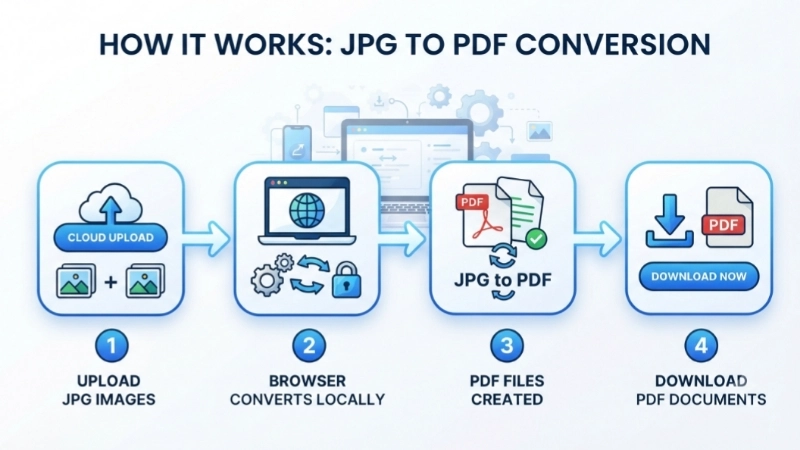
Step 1 – Select your images: Click the upload area and choose your JPG/JPEG files. You can select multiple for bulk convert jpg to pdf. We support .jpg, .jpeg, .jfif, .pjpeg, and .pjp.
Step 2 – Start conversion: Click the blue "Convert JPG to PDF" button. Your browser processes each image locally – nothing is uploaded. We add a 5-second delay to ensure smooth batch convert jpg to pdf even with many files.
Step 3 – Preview results: You'll see thumbnail previews of each PDF with filenames. Each card shows the original filename and new PDF name.
Step 4 – Download: Download individually using each card's button, or click "Download All PDF Files" to trigger all downloads at once. Perfect when you need to convert jpg to pdf in bulk and save time.
Why thousands choose this JPG to PDF converter
100% private: No upload means your photos stay on your device. We never see them.
Batch convert: Select multiple files and bulk convert jpg to pdf in one click.
Free forever: No limits, no watermarks, no "premium" tiers. Always free.
High quality: We preserve original resolution – PDFs look exactly like your JPGs.
Works everywhere: Phone, tablet, laptop – any device with a browser.
Batch download: Download all PDFs at once with one click.
When to use JPG/JPEG vs PNG – know the difference
When to Use JPG/JPEG
- Photographs and real-world images – like product photos, family pictures
- When file size matters more than perfect quality – JPG compresses well
- Social media posts and email attachments – faster uploads
- Images with gradients and smooth color transitions – like sunsets, skin tones
When to Use PDF
- Documents with text and formatting – like resumes, reports, invoices
- Files that need to be printed professionally – PDF preserves layout exactly
- When you want to lock the design – fonts, spacing, and margins stay fixed
- Documents that combine text, images, and tables – keeps everything together
- When security matters – PDF supports passwords and encryption
- Multi-page documents – like eBooks, brochures, manuals
- For archiving important records – PDF is widely accepted and long-lasting
Frequently asked questions about JPG to PDF conversion
⚡ Image Optimizer – more free tools You Might Need
Check these other free Quickly your photos, pictures – most popular tools all private, no upload
📖 Helpful Articles From read our Blog
Batch JPG to PDF: How to Convert Multiple Images at Once (No Stress)
No complicated steps. No expensive software. Just real help from someone who has done this hundreds of times. by the end of this article, you will be converting dozens of images to PDF in under a minute. Let me show you how.👉Read more ?
How to Compress a PDF for Email: The Ultimate Guide to Sending Large Files
No confusing jargon. Just real help from someone who has fixed this problem hundreds of times. So take a deep breath. You are about to learn a skill that will save you countless headaches.👉Read more ?
Why Every Content Creator Should Add Watermarks to Images
I will explain why every content creator should add watermarks to images. I will show you what watermarks do, how they protect you, and how to use them effectively.👉Read more ?