
Let me ask you a question. Have you ever visited a website and watched the images load slowly, one by one, while you waited impatiently? I have been there too. And it is frustrating.
A few years ago, I was running a photography blog. I was proud of my high-quality images. But my page load times were terrible. I had no idea that my JPG images were the problem.
Then I discovered WebP. I converted my images, and suddenly my site was twice as fast. My bounce rate dropped. My Google ranking improved. It was like magic.
Today, I will show you exactly why WebP loads faster than JPG. I will break down the technical differences in simple language. And I will give you practical advice on when to use each format.
Let’s settle this debate once and for all.
The Quick Answer: WebP Wins Every Time
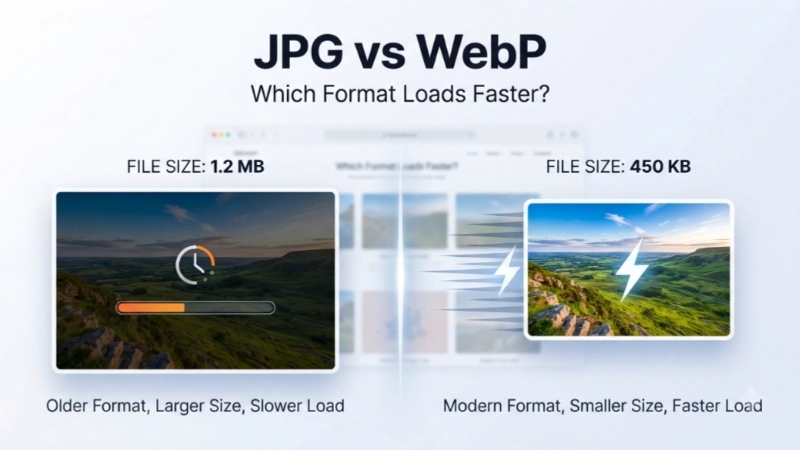
If you only have time to read one sentence, here it is: WebP loads significantly faster than JPG because the files are 25-34% smaller at the same visual quality.
That is not just marketing hype. That comes from Google’s own compression studies. In one experiment, researchers compressed images using both formats to match the same visual quality. The WebP files consistently came out smaller. On average, they were about 30% smaller than the JPG versions.
Real-world example: A 500KB JPG photo often compresses to just 300-350KB as a WebP with no perceptible quality loss. That means your website sends 150KB less data per image. Multiply that by 20 images, and your page becomes 3MB lighter. That is huge.
What Is JPG? The Old Reliable
JPG has been around since 1992. That is over 30 years. Every browser, every device, and every operating system supports it. It is the universal language of photos.
How JPG works: JPG uses a “lossy” compression method called DCT (Discrete Cosine Transform). It divides your image into small blocks and removes details that your eyes supposedly cannot see. The result is a smaller file. But some quality is lost permanently.
Strengths of JPG:
- Universal browser support (100% of browsers)
- Good balance of quality and size for photos
- Small file sizes compared to uncompressed formats
- Works everywhere, all the time
Weaknesses of JPG:
- Does not support transparency
- Does not support animation
- Quality degrades every time you save it
- Compression artifacts can appear at high compression levels
What Is WebP? The Modern Successor
WebP is a modern image format created by Google. It was designed specifically for the web, with one goal: smaller files, faster pages.
How WebP works: WebP uses predictive coding, the same method used in video compression. Instead of treating each pixel independently, it looks at neighbouring pixels to predict what comes next. Then it only stores the difference.
This is smarter than JPG. It results in better compression without sacrificing quality.
Key features of WebP:
- Lossy and lossless compression: You can choose between smaller files or perfect quality
- Transparency support: Unlike JPG, WebP supports alpha transparency (like PNG)
- Animation support: WebP can replace GIFs with much smaller files
- Meta-data support: It can store EXIF and XMP data like camera settings
Browser support in 2026: Every major browser supports WebP: Chrome, Firefox, Safari, Edge, and Opera. Only Internet Explorer is left out, and its global usage share is negligible. Over 92% of web users are on compatible browsers.
The Numbers: How Much Faster Is WebP?
Let me share the actual data. Google conducted a detailed study comparing WebP and JPG compression.
At the same visual quality (SSIM index):
| JPEG Quality | Average JPG Size | Average WebP Size | WebP is Smaller By |
|---|---|---|---|
| Q=50 (low quality) | 9.9 KB | 6.5 KB | 34% |
| Q=75 (medium quality) | 14.4 KB | 9.9 KB | 31% |
| Q=95 (high quality) | 31.3 KB | 23.4 KB | 25% |
In simple terms: WebP gives you the same visual quality with files that are 25-34% smaller. That means pages load 25-34% faster.
Another way to look at it: To get the same visual quality, WebP consistently requires fewer bits per pixel (bpp) than JPG. This holds true across different types of images: photos, graphics, screenshots, and more.
How Does WebP Achieve Better Compression?
Let me explain the technical difference in plain English.
JPG is like a photocopy machine. It looks at your image and removes small details to make the file smaller. It works, but it is not very smart.
WebP is like a video camera. It looks at your image in blocks and predicts what comes next. If a pixel is similar to its neighbour, WebP does not store the pixel twice. It just stores the difference.
Here are the specific techniques that make WebP superior:
1. Predictive coding: WebP uses the values of neighboring pixels to predict the values in a block. Then it only stores the difference. This means less data to store.
2. Block adaptive quantization: WebP allocates fewer bits to low-detail areas (like a plain sky) and more bits to high-detail areas (like a face). This results in better use of available data.
3. Arithmetic entropy coding: This achieves 5-10% better compression than the Huffman coding used in JPG.
4. Filtering: WebP applies filters to reduce artifacts at mid to low bitrates.
These techniques add up to a format that is not just a little better. It is significantly better.
Real-World Benefits for Your Website

Now let me tell you why this matters for you.
1. Faster page loading: WebP images load faster because they are smaller. This improves your Largest Contentful Paint (LCP) score, a key metric in Google’s Core Web Vitals.
2. Better Google rankings: Google has confirmed that page speed is a ranking factor. Faster pages rank higher. WebP helps you achieve that.
3. More conversions: Studies show that even a one-second delay in page load time can reduce conversions by 7%. Faster images = more sales.
4. Less bandwidth usage: If you pay for hosting bandwidth, smaller images save you money. If you have a high-traffic site, this matters a lot.
5. Better mobile experience: Mobile users often have slower internet connections. Smaller images mean faster loading on mobile.
When Should You Use WebP?
Use WebP for almost everything:
- Blog post images
- Product photos
- Web graphics and icons
- UI elements
- Most photos
When to use WebP for transparency:
- Logos that need transparent backgrounds
- Images that need alpha transparency
When to use animated WebP:
- To replace GIFs (WebP animations are much smaller)
When Should You Still Use JPG?
Use JPG when:
- You need 100% compatibility with every device ever created (including very old browsers)
- You are dealing with a legacy system that does not support WebP
- You need a very quick, no-hassle solution without any conversion
The reality: For over 92% of web users, WebP works perfectly. The only holdout is Internet Explorer, which has negligible usage.
Comparison Table: JPG vs WebP
| Feature | JPG | WebP |
|---|---|---|
| File size (same quality) | Larger | 25-34% smaller |
| Lossy compression | Yes | Yes |
| Lossless compression | No | Yes |
| Transparency support | No | Yes |
| Animation support | No | Yes |
| Browser support | 100% | 92%+ |
| Page speed impact | Moderate | Excellent |
| Best use cases | Photos, universal compatibility | Web graphics, photos, icons, logos |
Frequently Asked Questions (FAQs)
Q1: Is WebP always better than JPG?
For web use, yes. WebP provides smaller file sizes at the same visual quality. The only scenario where JPG is better is if you need 100% compatibility with very old browsers. But browser support for WebP is now nearly universal.
Q2: How much faster does WebP load compared to JPG?
WebP files are 25-34% smaller than comparable JPGs. This means pages with many images can load significantly faster. The exact speed improvement depends on the images and your internet connection.
Q3: Is WebP supported by all browsers?
WebP is supported by Chrome, Firefox, Safari, Edge, and Opera. Only Internet Explorer does not support it. Over 92% of web users are on compatible browsers.
Q4: Will I lose quality if I convert JPG to WebP?
Not if you choose the right quality setting. WebP can match JPG quality while providing smaller file sizes. At quality settings of 80-85%, the visual difference is imperceptible.
Q5: How do I convert my JPG images to WebP?
Use a free online tool like Top Image Fixer’s JPG to WebP Converter or install a WordPress plugin that handles it automatically.
Q6: Can I have both JPG and WebP on my site?
Yes. You can serve WebP to browsers that support it and JPG to those that do not using the <picture> tag. This is a best practice for backward compatibility.
Q7: Does WebP support transparency like PNG?
Yes. WebP supports alpha transparency in both lossy and lossless modes. Lossy WebP with transparency can be up to 3x smaller than PNG.
Q8: Is WebP the best image format for SEO?
Yes. Google uses page speed as a ranking factor. WebP images load faster, which improves page speed. This can positively impact your SEO rankings.
Actionable Conclusion: Your 30-Second Action Plan
You now know that WebP loads significantly faster than JPG. You understand the technical reasons why. And you know exactly when to use each format.
Here is what I want you to do right now:
Step 1: Find a JPG image on your device.
Step 2: Open a new browser tab and go to Top Image Fixer.
Step 3: Click on their free JPG to WebP Converter tool.
Step 4: Upload your JPG.
Step 5: Click convert.
Step 6: Download your WebP file.
Step 7: Compare the file sizes. See how much smaller the WebP is.
Step 8: Upload it to your website and test your page speed.
👉 Convert your first JPG to WebP for free here: [Click to use Top Image Fixer’s JPG to WebP Converter]
That is it. You just took the first step toward a faster, better-performing website.
Internal Linking Suggestions
- From this article, link to:
yourwebsite.com/compress-jpg-under-20kb(anchor text: “Need to compress images under 20KB for a specific form? Learn how here”) - From this article, link to:
yourwebsite.com/best-image-compression-tools(anchor text: “Check out the best image compression tools for bloggers and website owners”) - From your homepage, link to: This article using the anchor text: “JPG vs WebP: Which format loads faster?”
Disclaimer: The writer personally uses and recommends Top Image Fixer based on real, daily experience. The tool is genuinely free, safe, and beginner-friendly.