
📝 Rename Image Online – Free Image Renamer and Bulk Rename Tool
jpg file name change • rename image • rename photo • photo rename • rename jpg files online mobile
Change JPG file names easily – single or batch. Works on phone, computer, tablet. Fast & free tool.
Select JPG / PNG / WEBP Files (0)
tap or drag & drop – supports batch🖼️ Renamed Images (Click to download):
🔒 Your Privacy Matters - I Built This Differently
Your JPG files never leave your phone or computer. Every jpg rename happens right in your browser. No upload, no tracking, no servers. Just you and your files. This is how I wanted it for my own photos.
Hey, I'm Naresh – Here's Why I Built This JPG Renamer
So here's the thing – I run a small online store selling handmade pottery. Every week I photograph 30-40 new pieces. My camera names them things like IMG_9472.jpg, IMG_9473.jpg. Useless, right? When I'm uploading to my store, I need names like "blue_vase_front.jpg", "blue_vase_side.jpg".
I searched online for tools to rename jpg files. Found plenty. But every single one uploaded my product photos to their servers. My pottery designs, on some unknown server? No thanks. So one weekend, I built this. It runs entirely in your browser. Your photos never leave your device. I've been using it for two years now. My neighbor who's a wedding photographer started using it. My cousin uses it on his phone to rename jpg files online mobile for college projects.
Look, I'm not a big company. Just a guy who needed a simple tool that actually respects privacy. If you run a website, organize family photos, or just want to change file name jpg without stress, I hope this helps you.
– Naresh, creator of TopImageFixer
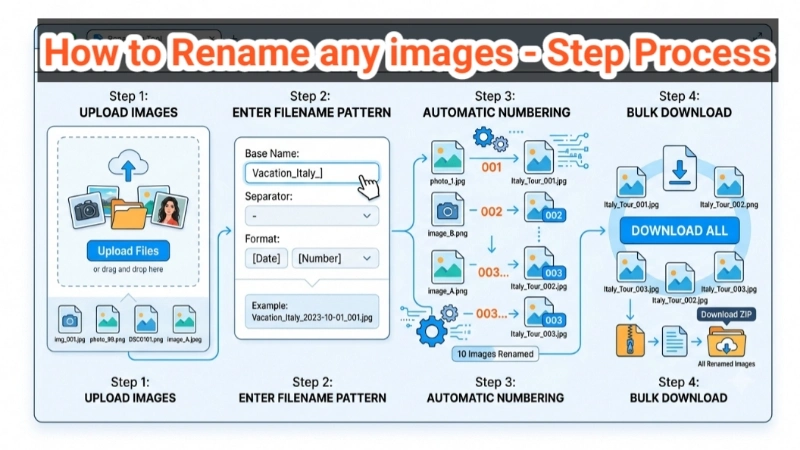
How to Rename JPG Images (4 Simple Steps)
Step 1 – Select Photos: Click upload area and pick your jpg files. You can select multiple – 5, 10, 50 at once. Works with PNG, WEBP too.
Step 2 – Enter New Name: Type what you want. For single photo, it becomes "yourname.jpg". For multiple, it becomes "yourname_1.jpg", "yourname_2.jpg" automatically.
Step 3 – Choose Download Way: "Bulk Download All" gets all at once as ZIP. "One by One" gives download buttons under each image.
Step 4 – Click Rename: Hit the button and see your renamed jpg files appear with thumbnails. Click any image to download, or use the green button for all.
That's it. Your original photos stay untouched. The renamed ones are new copies you save.
Real Talk: Why I'll Never Skip Renaming Again (And You Shouldn't Either)
Look, I'll be honest with you. For the longest time, I didn't bother renaming my photos. I'd shoot 50 pictures for my pottery shop and upload straight with names like IMG_4839.jpg. Seemed fine. Until one day, I needed to find a photo of a specific blue vase I'd sold three months ago. I spent 45 minutes clicking through hundreds of IMG_ files. That's when it hit me – those random filenames were stealing my time.
Think about it this way. Your photos are memories, products, or work. They deserve names that mean something. When you rename jpg file to "cousin_birthday_2025.jpg", ten years from now you'll know exactly what it is. It's not just about organizing – it's about respecting your own stuff.
My friend Neha, a teacher, used to send worksheets named "scan001.jpg". Parents would get confused. Now she renames image to "math_homework_1.jpg". Emails stopped. Such a small thing changed her workflow completely.
My simple rule: If I take a photo that matters, it gets a real name right away. Product shots? "blue_vase_". Family vacation? "goa_2025_". Future me is always grateful.
– Naresh (who learned this the hard way)
Smart Tips for JPG File Name Change
• Use underscores, not spaces: "my_photo.jpg" works everywhere. "my photo.jpg" might break on some websites.
• Add dates or categories: "vacation_paris_2025_1.jpg" tells you everything. "IMG_9472.jpg" tells you nothing.
• Keep original backups: We don't touch originals, but still good habit to have folders organized.
• Combine with other tools: After renaming, use our image resizer or watermark tool – all private, no upload.
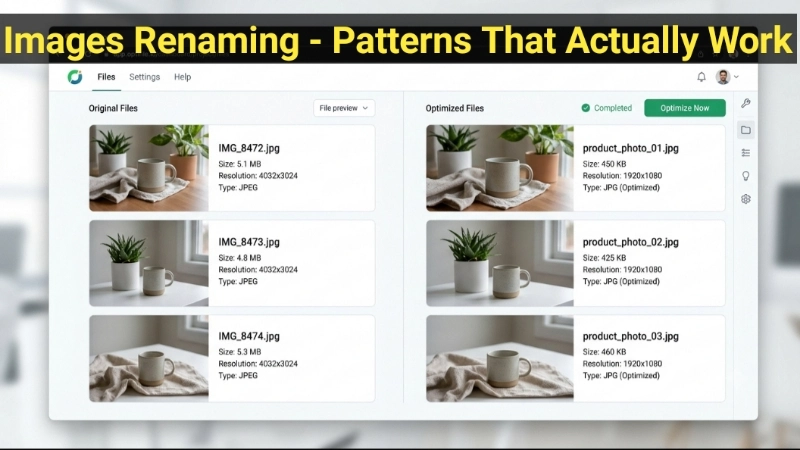
Naming Patterns That Actually Work
For products: "category-color-number.jpg" → "vase-blue-01.jpg", "vase-blue-02.jpg"
For travel photos: "place-year-desc.jpg" → "paris-2025-eiffel-1.jpg"
For documents: "doc-type-date.jpg" → "passport-naresh-2025.jpg"
For school: "class-assignment-topic.jpg" → "biology-cell-diagram-1.jpg"
Good names mean you actually find files months later. Bad names mean searching through hundreds of IMG_ files.
Frequently Asked Questions (FAQ) – Image Renamer
⚡ Image Optimizer – more free tools You Might Need
Check these other free Quickly your photos, pictures – most popular tools all private, no upload
📖 Helpful Articles From read our Blog
How to Rename Multiple Images at Once Online (No Software Needed)
There is a better way. You can rename multiple images at once online in seconds. No software to install. No expensive tools. Just a free online tool and a few clicks.👉Read more ?
Best Image Compression Tools for Bloggers and Website Owners
I will share with you the best image compression tools I have personally used and tested. Whether you are a blogger, a website owner, or someone who just wants faster loading pages, this guide is for you.👉Read more ?
Stop Messy Filenames! The Easiest Way to Photo Rename Online
I am going to teach you exactly how to rename image online — for free, without installing anything, and in just a few seconds. Whether you have 5 photos or 50 photos, this guide will save you hours of frustration.👉Read more ?
All Formats Supported
Rename any image format – same tool works for all