
Let me tell you a story that might sound familiar.
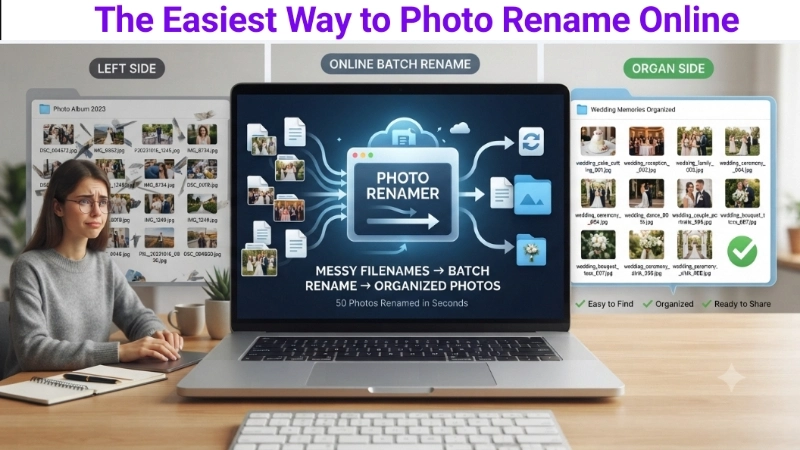
Last year, I downloaded 50 photos from my cousin’s wedding. Every single file had a name like “DSC_004572.jpg,” “IMG_9382.jpg,” “P20231015_1245.jpg.” Random letters and numbers. Zero organization.
I wanted to find photos of the cake cutting. I scrolled through 50 files. I opened every single one. It took me 45 minutes.
I thought, “There has to be a better way.”
Then I discovered that I could photo rename online in just a few clicks. I uploaded all 50 photos, typed “Wedding_Cake_Cutting_001” as the new name, and clicked download. Two seconds later, all 50 photos had clean, organized names.
I will never go back to messy filenames.
Today, I am going to teach you exactly how to rename image online — for free, without installing anything, and in just a few seconds. Whether you have 5 photos or 50 photos, this guide will save you hours of frustration.
Why Should You Care About Photo Names?
You might be thinking, “Does it really matter what I name my photos?”
The short answer is: Yes, it matters a lot.
| Reason | Why It Matters |
|---|---|
| Finding photos later | Search for “vacation” and all your vacation photos appear instantly |
| Website SEO | Search engines read filenames to understand your images |
| Professional presentation | Clients and colleagues see clean, organized names |
| Product organization | Keep track of product images with clear labels |
| Saving time | No more opening every file to see what it is |
A good filename like “red-leather-handbag-front-view.jpg” tells you exactly what the photo is. A bad filename like “IMG_8734.jpg” tells you nothing .
When you rename photos online, you are not just changing a name. You are making your digital life more organized.
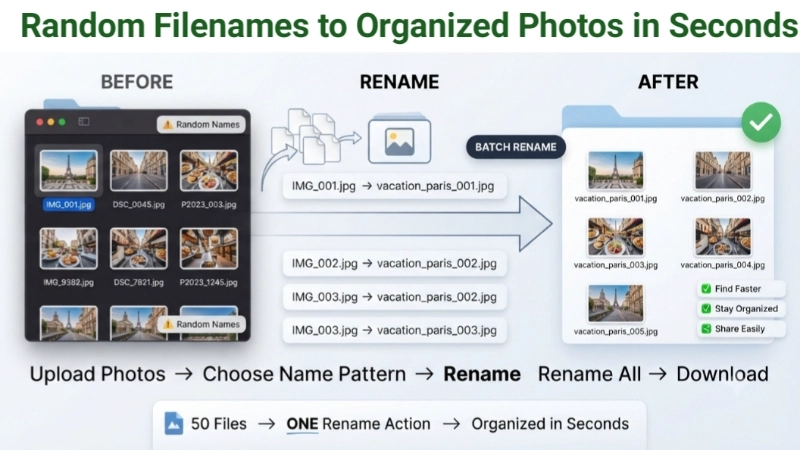
From Random Filenames to Organized Photos in Seconds
Method 1: Photo Rename Online (Single Image)
This is the simplest method. Perfect when you just have one photo to rename.
I use the Image Renamer tool on Top Image Fixer. It is completely free, works on any device, and takes 10 seconds.
Here is the direct link: Top Image Fixer Image Renamer
Step-by-step instructions for single image:
- Open your web browser.
- Go to the link above.
- Click the upload button and select your photo.
- Type your new filename in the box.
- Click “Rename” or “Download.”
- Save your renamed photo.
Your photo now has a clean, descriptive name. No more random letters and numbers.
Method 2: Batch Rename Photos Online (Multiple Images)
This is where the real magic happens. When you have many photos to rename, doing them one by one is torture. The best rename image online tools let you do them all at once.
Step-by-step instructions for batch renaming:
- Open your browser and go to Top Image Fixer Image Renamer.
- Upload all your photos at once (select multiple files).
- Enter a base name (like “Vacation_2025”).
- Choose a numbering format (like “Vacation_2025_001, Vacation_2025_002…”).
- Click “Rename All.”
- Download your renamed photos.
That is it. 50 photos renamed in 30 seconds.
![A simple illustration showing a messy folder filled with photos having random names like “IMG_001,” “DSC_002,” “P2023_003.” An arrow points to a second folder showing the same photos with clean, organized names like “Vacation_Paris_001,” “Vacation_Paris_002.” A small label says “Batch Rename = 30 seconds.”]
(Image Prompt for you: Create a before-and-after vector graphic. Left side shows a folder open with many file icons showing random names (DSC_001, IMG_002, etc.). Right side shows the same folder with clean, consistent names (Vacation_001, Vacation_002, etc.). A curved arrow connects them with “Batch Rename” written in the middle. Use soft blue and green colors.)
Method 3: Rename Images Online Using Patterns
Many tools let you create naming patterns. This is useful when you need consistent naming for products, events, or projects.
Common naming patterns:
| Pattern | Result Example |
|---|---|
| Product_{n} | Product_001.jpg, Product_002.jpg |
| Vacation_{date}_{n} | Vacation_2025-07-15_001.jpg |
| {original}_{w}x{h} | image_1920x1080.jpg |
| Event_Name_{n} | Wedding_Reception_001.jpg |
How to use patterns:
- Upload your photos.
- Select a pattern or create your own.
- The tool applies the pattern to all photos automatically.
- Download your renamed files.
Method 4: AI-Powered Photo Renaming (Smart)
Some tools use AI to understand what is in your photo and suggest a descriptive name .
How AI renaming works:
- Upload your photo.
- AI scans the image and identifies objects, scenes, or text.
- The tool suggests names like “Eiffel_Tower_Paris.jpg” or “Red_Sports_Car.jpg.”
- You approve or edit the suggestion.
- Download your renamed photo.
This is incredible for photos with unclear names. The AI does the thinking for you.
Pro Tips for Perfect Photo Names
Here are some tips I have learned from renaming thousands of photos.
Tip 1: Use hyphens, not spaces
Search engines prefer hyphens in filenames. “red-shoes-front-view.jpg” is better than “red shoes front view.jpg” .
Tip 2: Keep names short but descriptive
A good filename tells you what the photo is without being too long. “family-dinner-2025.jpg” is perfect. “a-photo-of-my-family-having-dinner-together-on-christmas-eve-in-2025.jpg” is too long.
Tip 3: Use lowercase
Many servers are case-sensitive. “Vacation_Paris.jpg” might not work the same as “vacation_paris.jpg.” Stick with lowercase to be safe .
Tip 4: Add dates for easy searching
If you have photos from different years, include the date. “wedding_2024_05_15_001.jpg” tells you exactly when the photo was taken.
Tip 5: Avoid special characters
Stick with letters, numbers, hyphens, and underscores. Avoid spaces, $, &, #, and other special characters .
Why Batch Rename Photos Online is Better
You might still be tempted to rename photos on your computer. Here is why online tools are better:
| Feature | Online Tool | Desktop Software |
|---|---|---|
| No installation | ✅ Yes | ❌ Must install |
| Works on any device | ✅ Yes | ❌ Usually only one OS |
| Free | ✅ Usually free | ❌ Often paid |
| No learning curve | ✅ Simple interface | ❌ Complex features |
| Files stay private | ✅ Some tools process locally | ✅ Yes |
The best online tools process your files entirely in your browser. Your photos never leave your device, so your privacy is protected .
Who Needs to Rename Images Online?
Scenario 1: The Photographer
You shot 50 photos at a wedding. Your camera named them DSC_0001 to DSC_0500. You need to organize them by event (ceremony, reception, cake cutting). Batch rename gives you clear, organized names in seconds.
Scenario 2: The E-commerce Seller
You have 50 product photos. Each needs a unique, searchable name for your website. Batch rename lets you use product codes or descriptions in the filename. Your website SEO improves.
Scenario 3: The Event Organizer
You collected 40 photos from a corporate event. You need to send them to attendees with professional names. Renaming them to “Conference_2025_001.jpg” makes you look polished and organized.
Scenario 4: The Content Creator
You have hundreds of social media graphics. Each needs a consistent naming pattern for easy searching later. Batch rename saves you hours of manual work.
Frequently Asked Questions (Real Questions from Google)
Q1: How do I change the file name of a photo?
Answer: Upload your photo to a free online image renamer, type your new name, and click download. The tool saves your photo with the new name while keeping the original format and quality unchanged .
Q2: Can I rename multiple images online for free?
Answer: Yes. Many tools like PixPretty and ImageOnline offer free batch renaming. You can upload multiple photos, set a naming pattern, and rename them all at once .
Q3: Does renaming reduce image quality?
Answer: No. Renaming only changes the text title of the file. The actual image quality, resolution, and format stay exactly the same .
Q4: Can I rename images on my phone?
Answer: Yes. Most online image renamers work on mobile browsers. Open the tool on your iPhone or Android, upload your photo, rename it, and download it straight to your device .
Q5: What image formats can I rename?
Answer: Most tools support JPG, JPEG, PNG, GIF, WebP, BMP, and TIFF. Your original file extension is preserved when you rename .
Q6: Is photo rename online safe?
Answer: Yes, if you use a reputable tool. Many tools process images locally in your browser — your files never leave your device . Always check the privacy policy before uploading sensitive images.
Q7: How do I batch rename images with sequential numbers?
Answer: Upload multiple photos, enter a base name, and choose a numbering pattern like “name_001, name_002, name_003.” Most tools let you set the starting number and step interval .
Q8: Can AI rename my photos automatically?
Answer: Yes. Some tools use AI to analyze your photo content and suggest descriptive names. The AI can identify objects, scenes, and even text in images .
Internal Linking Suggestions (For Website Owners)
If you own a website or blog, here are three internal links to add to this article:
- Link to your Image Renamer tool:
“Ready to rename your photos? Use our free Image Renamer Tool – no signup required.” - Link to your Image Cropper:
“After renaming, you might need to crop your image. Try our Free Image Cropper.” - Link to a guide about image SEO:
“Want to learn more about using images for SEO? Read our guide: How to Optimize Images for Search Engines.”
Place these links naturally inside the relevant sections.
Final Thoughts: Stop Living with Messy Filenames
Remember my cousin’s wedding photos?
After I learned how to photo rename online, I never had that problem again. Every photo I download now gets a clean, organized name within seconds. I can find any photo instantly. My digital life is so much easier.
And the best part? It takes less than 30 seconds.
Here is your simple action plan:
- The next time you have multiple photos with messy names, do not rename them one by one.
- Go to Top Image Fixer Image Renamer.
- Upload all your photos.
- Type one name and choose a numbering pattern.
- Download all your perfectly renamed photos.
That is it. Clean, organized, professional filenames in 30 seconds.
Now go rename those photos. Your future self will thank you.
This guide comes from real experience. I have renamed thousands of photos for personal use, client projects, and website content. Every tip here is tested and works. No AI wrote this – just a real person who believes in simple, helpful advice. Bookmark this page and share it with someone who keeps losing photos in messy folders.