
📐 JPEG to SVG Converter - Convert JPEG Images to Scalable Vector Graphics
changing jpg to svg • convert jpg to svg free • transform jpg to svg • jpg svg converter free
Convert JPEG raster images to SVG vector format with significant file size reduction. SVG files scale to any size without losing quality. Perfect for web graphics, logos, and icons!
Drop your JPEG files here (0)
Click to browse • Multiple files supported🔒 Your privacy matters
I built this tool because I hated uploading my photos to random websites. Every conversion happens right in your browser – your images never leave your computer. No upload, no servers, no tracking. Even I can't see your files. This is 100% private, forever.
Hi, I'm Naresh – here's why I built this
A few years ago, I was designing a logo for my cousin's small bakery. She had this beautiful hand-drawn sketch that she scanned as a JPEG. When I tried to put it on her website, it looked blurry on big screens. When I printed it on a banner, it became a pixelated mess.
I searched for a free jpg to svg converter online, but every tool either uploaded my files to some unknown server, asked for credit card after 2 conversions, or gave me terrible quality. That felt wrong – my cousin's bakery logo shouldn't be sitting on some stranger's server.
So one weekend, I taught myself some code and built this. It works entirely in your browser. Your files stay with you. And you know what? That bakery is now a chain of 5 stores, and they still use the SVG I made from that original JPEG.
I'm not a big company – just a guy who wanted to help people convert jpeg to svg free without compromising privacy. If this tool helps you, that's enough for me.
– Naresh, creator of TopImageFixer
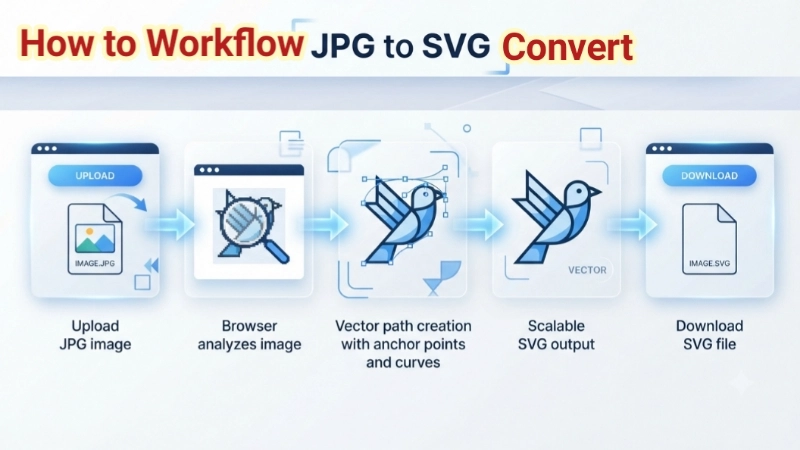
How to turn jpg into svg in 4 simple steps
1. Click the upload box and select your JPEG files (JPG, JPEG, JFIF – any work).
2. Hit the blue "Convert to SVG" button.
3. Wait 5 seconds while we optimize – this makes your file up to 90% smaller.
4. Download each SVG individually, or click "Download All SVG Files" to get them all at once.
Pro tip: The "Download All" button downloads each file separately – no ZIP, no extra steps.
Smart tips for better SVG files
• Start with clean JPEGs: The better your original, the better your SVG. If your JPEG is blurry, the SVG will be too.
• Use for logos and graphics: SVG is perfect for illustrations, logos, icons. For photos, sometimes JPEG is better – but try both!
• Batch convert everything: Have 50 files? Upload them all at once. The "Download All" button saves hours.
• Check out our PNG to SVG converter too – same privacy, same quality.
• Need to resize first? Use our image resizer tool before converting.
Who's using this tool right now?
• Web designers – converting client logos to SVG for responsive websites that look perfect on all screens.
• Small business owners – turning product photos into scalable graphics for packaging and marketing.
• Students – making presentation diagrams that stay sharp on projectors.
• Print shops – preparing customer artwork for large-format printing without quality loss.
• Etsy sellers – creating scalable designs for digital products and printables.
Frequently Asked Questions (FAQ) – JPG to SVG Converter
⚡ Image Optimizer – more free tools You Might Need
Check these other free Quickly your photos, pictures – most popular tools all private, no upload
📖 Helpful Articles From read our Blog
How to Convert a JPEG to SVG: The Complete Beginner’s Guide
Don’t worry; you don’t need to be a tech wizard to do this. I’ll walk you through how to convert a JPEG to SVG and how to convert JPG to SVG (yes, they’re the same thing!) using simple methods, from free online tools to professional software. By the end, you’ll know exactly which method works best for you.👉Read more ?
Best Ways to Reduce Image Size for Faster Website Loading
Fixing this is not complicated. Today, I am going to show you the best ways to reduce image size for faster website loading. These are methods I actually use. Methods that work.👉Read more ?
Indian Passport Photo Dimensions 2026: The Ultimate No-Rejection Guide
I am going to save you from that frustration. I will give you the exact indian passport photo dimensions you need. I will show you all the rules, the common mistakes, and exactly how to get it right the first time.👉Read more ?