
PDF to BMP Converter

πŸ“„ PDF to BMP Converter - Convert PDF Files to BMP Images Online

pdf to bmp β€’ convert pdf to bmp β€’ convert pdf to bitmap β€’ pdf to bitmap file

Convert PDF to BMP free online – each PDF page becomes a separate bitmap image. PDF to BMP converter free online with no upload, 100% private.

Upload PDF Files (0)

Each PDF page converts to separate BMP – convert pdf to bitmap
⏳ Converting PDF pages to bitmap images... Please wait.

πŸ”’ Your Privacy Matters

We do not store any PDFs or images. All conversions run directly in your browser (client‑side). No upload, no tracking, no cookies. Your files never leave your device. This is a true pdf to bitmap converter free online that respects your privacy.

Why I Built This PDF to BMP Converter – A Real Story

Hey there! I'm Naresh, a small business owner and part-time coder. A few years ago, I needed to extract product images from PDF catalogs for my online store. I searched for "convert pdf to bmp free online" and found dozens of tools. But every single one asked me to upload my files to their server. I didn't feel comfortable sending my supplier catalogs – with pricing and product details – to some unknown company.

So one weekend, I built my own pdf to bitmap converter. I wanted something that worked entirely in the browser – no upload, no servers, no privacy worries. Now I use it every week for my business, and my accountant uses it too for extracting receipts from PDF statements.

What makes this PDF to BMP converter free online different? Three things: privacy (nothing leaves your device), quality (lossless BMP format preserves everything), and simplicity (just drag, click, download). No sign-ups, no limits, no hidden costs.

– Naresh, creator of TopImageFixer (PDF to BMP Converter)

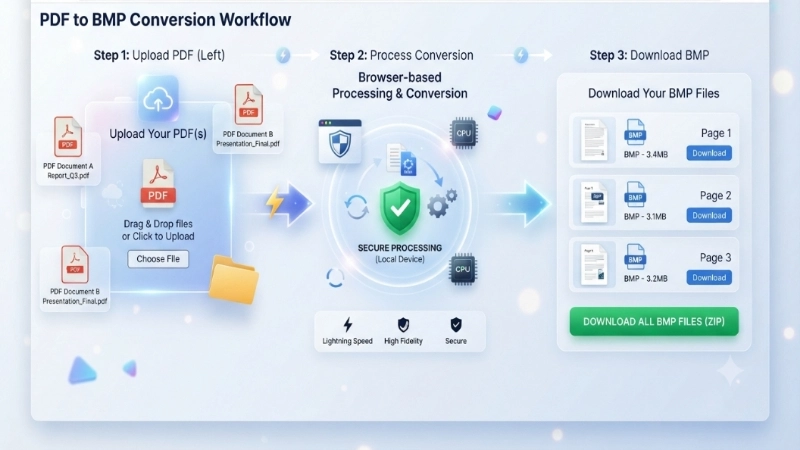
How to Convert PDF to BMP in 3 Simple Steps

Step 1: Click the upload area and select your PDF files (you can select multiple PDFs – great for batch needs).
Step 2: Hit "Convert PDF to BMP". Your browser does all the work; nothing is uploaded to any server.
Step 3: Each PDF page becomes a separate BMP image. Download individually or click "Download All BMP Files" to get every image at once.
Pro tip: BMP files are lossless – perfect for editing in Photoshop or printing at high quality.
Real People, Real Uses – How Others Benefit

For Graphic Designers: My cousin Priya is a graphic designer. She gets client brochures as PDFs but needs the images in BMP format for Photoshop work. She uses this pdf to bitmap image converter daily. "It saves me hours of screenshotting and cropping," she says.

For Small Business Owners: Our neighbor Mr. Sharma runs a real estate agency. He converts floor plans from PDF brochures to BMP for his listings. "No more asking the IT guy for help," he told me. "I do everything myself now."

For Students: A college student uses this tool to extract lecture slides from PDF handouts. She convert pdf to bitmap for each slide, then studies them on her phone. "The images are crystal clear," she wrote.

Tips for Best Results When You Convert PDF to BMP

β€’ BMP files are large but worth it – they're uncompressed, so size depends on image complexity. A text page might be 500KB, a photo page could be 5MB. That's normal for lossless quality.

β€’ Batch download works simply – Click "Download All" and your browser handles each file individually. For large batches, it's straightforward.

β€’ Password-protected PDFs won't work. Remove password first using our PDF Unlock tool – it's also private.

β€’ Optimal quality only: This converter automatically scales based on your PDF size. Small PDFs get standard resolution, large PDFs get higher resolution.

When Should You Convert PDF to BMP Instead of Other Formats?

Use BMP when: You need to edit PDF content in Photoshop, GIMP, or other image editors; you're archiving documents permanently and want lossless quality; you're sending files to professional printers who prefer uncompressed formats; you need to extract logos, diagrams, or photos for reuse.

Use JPG or PNG when: You need smaller files for email or web use; you're sharing on social media where file size limits matter; you don't need to edit the images further.

Every format has its place. This pdf to bmp converter free online gives you the highest quality option when you need it most.

Frequently Asked Questions About PDF to BMP Conversion

What is PDF to BMP conversion and why would I need it?
PDF to BMP conversion means turning each page of your PDF into a BMP (bitmap) image. BMP is a lossless format – it preserves every pixel perfectly. You'd need this when you want to edit PDF content in Photoshop, archive documents permanently, extract images for printing, or when you need the highest quality possible. Unlike JPG which compresses and loses quality, BMP keeps everything exactly as it was in your PDF.
Is this PDF to BMP converter really free? Any hidden costs?
Yes, it's completely free with no hidden costs. No sign-ups, no credit cards, no limits. I built this tool for my own use and decided to share it with everyone. You can convert as many PDFs as you want, as many pages as you want, all for free. The only "cost" is that everything runs in your browser, so your computer does the work – but that's actually a privacy benefit!
Do you save my PDFs on your server? I'm worried about privacy.
I completely understand that concern – especially with sensitive documents like contracts, ID proofs, or personal photos. That's why this tool is built differently: NOTHING ever gets uploaded. The entire conversion happens inside your own browser. Your PDFs never leave your phone or computer. Even I can't see them. So feel safe – your private documents stay private forever.
Can I convert multiple PDF files at once to BMP?
Absolutely! Just select multiple PDFs when you upload. I regularly convert 10-15 PDFs at once for my business. Each page from every PDF becomes a separate BMP image. After processing, you'll see each image card with its own download button. And if you want all of them at once, click the green 'Download All BMP Files' button – your browser will prompt you to save each file individually. Perfect for batch processing!
What's the difference between BMP and JPG when converting from PDF?
Great question! BMP (bitmap) is uncompressed – it preserves every single pixel exactly as rendered from your PDF. Files are larger but perfect for editing in Photoshop, professional printing, or permanent archiving. JPG compresses the image, which loses some quality but creates smaller files. Think of BMP as the master file (like a negative from film) and JPG as a print. We also have a PDF to JPG tool if you need compressed versions.
Will my PDF pages look blurry after BMP conversion?
No, never! This converter always uses your PDF's optimal size and resolution. BMP is lossless, so quality is preserved exactly as rendered. If your PDF has high-quality images, they'll stay high-quality. If it has low-res images, they'll stay low-res – but we never add blurriness or artifacts. The tool automatically adjusts scaling based on your PDF size to give you the best possible quality.
Is there a limit on PDF size or number of pages?
No fixed limit, but your computer might slow down if you convert 100+ page PDFs with many high-res images, because everything runs in your browser. For normal use (up to 50 pages per PDF) it works smoothly. Each file can be up to 50MB, which covers most PDFs. If you have a huge PDF with hundreds of pages, I'd recommend splitting it first using our PDF Splitter tool – then convert each part separately.
Can I use this PDF to bitmap converter on my phone?
Yes, it works perfectly on any device – iPhone, Android, iPad, laptop. The layout adjusts so you can easily tap the buttons. I've used it many times on my phone to quickly extract images from PDF receipts. Just upload PDFs from your phone storage and download BMPs directly. No app needed, just a browser. It's truly mobile-friendly.
Why do BMP files vary in size even from the same PDF?
Great observation! BMP is uncompressed, so file size depends on image content. A page with lots of text and simple graphics will be smaller than a page with complex photos or gradients. The BMP format stores every pixel individually, so more complex content = larger file. That's why a text-only PDF page might give you a 500KB BMP, while a photo-rich page could give you a 5MB BMP – both at the same dimensions.
How do I download all BMP files at once without ZIP?
After conversion, you'll see a green 'Download All BMP Files' button. Click it, and your browser will start downloading each BMP file one by one (with a small delay between each). This keeps things simple and doesn't require ZIP software. For 10-20 files it works great – just let your browser handle the multiple downloads. Make sure your browser allows multiple downloads (most modern browsers do).

⚑ More Free PDF & Image Tools You Might Need

All tools are 100% private, no upload, runs in your browser

πŸ“– Helpful Articles from Our Blog

PDF to BMP vs PDF to JPG: Which is Better for Your Needs?

Complete comparison of file sizes, quality, and use cases. When to use uncompressed BMP vs compressed JPG.

How to Extract Images from PDF Without Losing Quality

Step-by-step guide to get high-resolution images from any PDF document. Perfect for designers and archivists.

Understanding Bitmap vs Vector: When to Use Each Format

Clear explanation of BMP, JPG, PNG, and vector formats. Make informed choices for your projects.

All Formats Supported

PDFBMPJPG/JPEG PNGWEBPGIF TIFFSVG