
🖼️ PNG to BMP Converter - Convert PNG Images to Bitmap Format
png to bmp • convert png bmp • png to bitmap • bulk png to bmp • png to bmp converter free
Convert PNG images to BMP (Bitmap) format instantly. BMP files are uncompressed and preserve all image data. Perfect for editing and professional graphics work!
Upload PNG Images (0)
Drag & Drop or Click – multiple files supported🔒 Your privacy matters – I built this for you
No upload. No tracking. No servers. This PNG to BMP converter runs completely in your browser. Your images never leave your device. I created this tool because I was tired of converters that ask for uploads – this one is different.
Hey, let me tell you why I built this PNG to BMP converter
My name is Naresh, and I'm a small business owner who also does graphic design on the side. A few years ago, I was working on a brochure for my shop and needed to convert some PNG logos to BMP format because the printing press specifically asked for bitmap files. I searched online for "png to bmp converter" and found dozens of tools. But every single one uploaded my files to their server. I had no idea where my images were going – my shop logo, my product photos, even some personal stuff.
That felt wrong. So I did what any frustrated person would do – I built my own. I spent a weekend learning how PNG and BMP formats work, how to convert between them using just JavaScript, and created this tool. It works entirely in your browser. Nothing gets uploaded. Your files stay on your computer. That's why I can honestly say this is the safest png to bmp file converter you'll find online.
How I use this tool in my daily work: Every week, I photograph new products for my store – handmade pottery and crafts. I save them as PNG because it's high quality. But when I send files to my printer for catalog printing, they demand BMP format. I used to convert them one by one in Photoshop, which took forever. Now I just drag all my PNG files into this tool, wait a moment, and download each BMP. It saves me at least an hour every week. If you do any kind of converting png to bmp regularly, you know how valuable that time is.
My cousin the photographer loves the batch feature: My cousin Priya is a wedding photographer. She shoots in RAW, converts to PNG for editing, but sometimes clients ask for BMP files because they want absolutely no compression. She started using this tool to change png to bmp in batches – 50 photos at a time. She told me it's perfect because she can just click download on each image without worrying about quality loss. And since nothing uploads, her clients' private wedding photos stay private.
– Naresh, creator of TopImageFixer (PNG to BMP Converter)
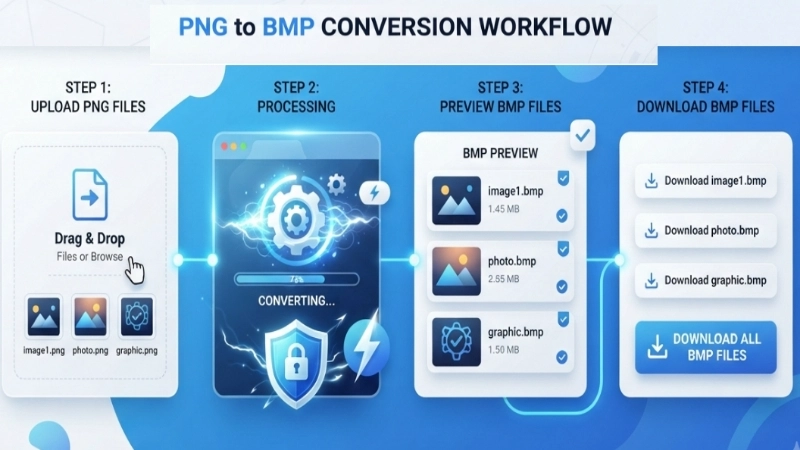
How to convert PNG to BMP in 4 simple steps
Step 1: Click the upload area above and select your PNG files (you can pick multiple). Our png to bmp file converter accepts any PNG image.
Step 2: Click "Convert PNG to BMP" – the tool processes everything in your browser. No upload means it's fast and private.
Step 3: Wait a moment (actual time depends on how many files and their size). You'll see preview cards for each converted image showing the original PNG preview.
Step 4: Click "Download BMP" under each image to save it, or use the "Download All BMP Files" button to get every BMP file individually (not as a zip).
Tips for better PNG to BMP conversion
• Keep originals: Always save your original PNG files. BMP is larger, so you might want both versions.
• Check transparency: Remember, BMP doesn't support transparency – transparent areas become white.
• Batch convert wisely: When doing bulk png to bmp, your browser might slow down with 50+ large images. Convert in smaller batches for best performance.
• Use for editing: Convert to BMP before heavy editing, then save final version as PNG for web use.
Frequently asked questions about PNG to BMP conversion
⚡ Image Optimizer – more free tools You Might Need
Check these other free Quickly your photos, pictures – most popular tools all private, no upload
📖 Helpful Articles From read our Blog
How to Convert PNG to BMP: A Complete Beginner-Friendly Guide
The good news is, it is actually very simple once you know how. I will walk you through everything you need to know about converting PNG to BMP, from basic steps to the best tools you can use.👉Read more ?
How to Optimize Images for Website (Without Slowing Down Your Site)
If you are here because your website feels slow, or because someone told you to “optimize your images” and you have no idea what that means, you are in the right place. how to optimize images for website IN No confusing jargon. Just real steps that work.👉Read more ?
How to Compress a PDF for Email: The Ultimate Guide to Sending Large Files
I will show you exactly how to compress PDF for email using free tools that anyone can use. I will explain what a PDF compressor for email does. And I will share practical tips to get your file under the size limit every single time.👉Read more ?