
✂️ Online Image Cropper – Free Photo Cropping and Circle, Heart, Star & More
crop picture into circle • round crop photo • circle crop image • free image cropper • free picture cropper
100% private – your photos stay on your device. Built for social media profiles, passport photos, and creative projects.
Click or drop image to crop
✨ Your cropped image
🔒 Your privacy matters – real talk
I never see your photos. Unlike other sites, this tool runs completely in your browser. No upload, no copies on my server. You drag, you crop, you download – that's it.
What Is an Online Image Cropper?
It's simply a tool that lets you cut a picture down to the part you want. You know when you take a photo and there's too much empty space around the edges? Or you want to use only your face for a profile picture? That's where an online image cropper comes in. You draw a box around the important bit, and the tool keeps that and throws away the rest.
But here's the twist – most basic croppers only give you a plain square or rectangle. That's fine for some things, but what if you want a circle crop image for Instagram? Or a heart crop for a Valentine's post? That's why I built this one. It lets you crop a picture online free into any shape you like – circle, heart, star, rounded corners. And because it runs right in your browser, there's no waiting, no uploading to some unknown server.
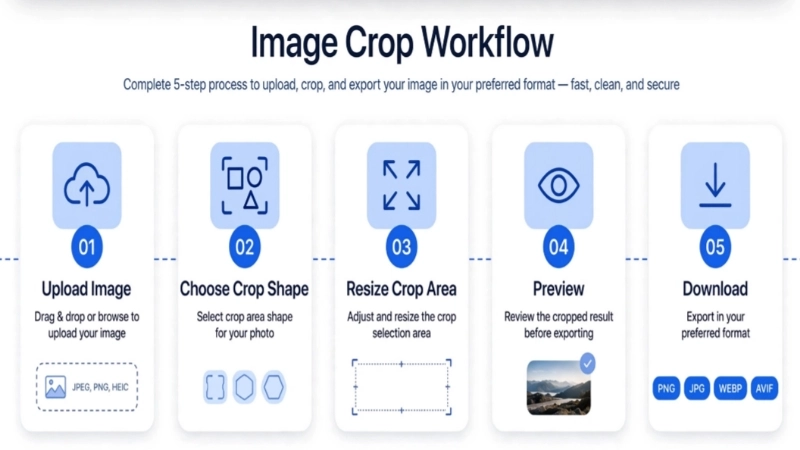
Who Should Use This Online Image Cropper?
• Social media folks: If you manage a Facebook page, Instagram account, or WhatsApp business profile, a round crop photo tool is essential. Use this to crop to perfect circle or square, set aspect to 1:1, and download.
• Small business owners (like me!): I crop product photos into circles for badges, logos, and team photos. The star and heart shapes are great for seasonal promotions.
• Students and teachers: Need to highlight a diagram or create a profile for a school portal? This tool works right on your Chromebook.
• Anyone who cares about privacy: If you're worried about where your photos go, this tool is for you. No upload, no sharing.
Why You'll Love This Photo Cropper
Because it actually respects you. No hidden uploads, no asking for your email, no "you've reached your free limit". You just crop photo into circle (or heart, or star) and you're done. The interface is clean, controls are right there, and you see exactly what you're getting before you download. Plus, you can download in PNG (transparency), JPG (white background), WEBP, or AVIF.
Why I made this free image cropper (and how it helps you)
Hey, I'm Naresh. A few years ago I was helping my sister set up her small bakery's Instagram. She had amazing photos of cakes, but every time she tried to make a profile picture, she'd end up with a square that cut off half the icing. I searched for a circle crop image online tool, but most either uploaded her photos to some random server or asked for payment after one use. That's when I decided to build my own – a photo cropper that works right here, never uploads anything, and lets you crop picture into circle, heart, star, whatever you want.
Now this tool is used by students, shop owners, and even a wedding photographer. They cut out image free for invites, make rounded corners image for thumbnails, and prepare crops without any hassle. No sign‑ups, no watermarks, no "premium" upsells.
Need to reduce image size after cropping? Try our Image Size Reduce. And if you're preparing official documents, the Passport Size tool can help. All private, all free.
✂️ Why do we crop images? And what are the different types?
Why crop a photo?
You might think cropping is just about cutting away unwanted parts – and sure, that's part of it. But cropping is one of the most powerful ways to change how a picture feels. Think about a photo of your dog running in a big park. If you crop tight around the dog, suddenly the focus is all on him – his expression, his energy.
I crop images every day for my online shop. A product photo with lots of empty background doesn't sell as well as one where the item fills the frame. When you crop a picture online free, you're directing the viewer's eye. You're saying "look here, this is important".
Another big reason: composition. Sometimes a photo is almost perfect, but there's a distracting element at the edge – a trash can, a stranger walking by. By using a circle crop image or a simple rectangle crop, you can remove that distraction and make the photo clean.
Different kinds of crops
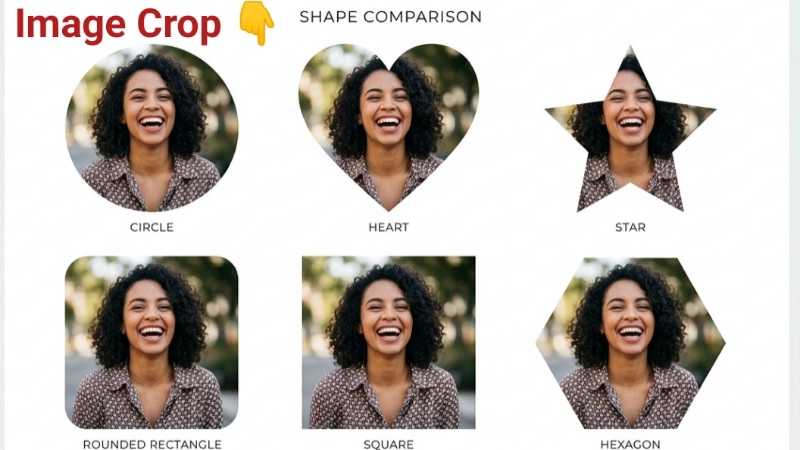
Circle crop – perfect for profile pictures (Facebook, WhatsApp, Instagram). Softer, friendlier look.
Heart crop – great for Valentine's promos, love-themed posts, maternity announcements.
Star crop – playful, energetic. Perfect for kids' party invites or highlighting "staff pick".
Rounded corners – softer, more modern than sharp rectangles. Great for thumbnails and cards.
Aspect-ratio crops – 16:9 for YouTube thumbnails, 1:1 for Instagram grid.
So next time you need to crop a picture online, think beyond the rectangle. Pick a shape that matches the mood of your image.
Frequently Asked Questions (FAQ) - Crop Images Tool
⚡ Optimizer – more free tools You Might Need
Check these other free Quickly your photos, pictures – most popular tools all private, no upload
📖 Helpful Articles From read our Blog
How to Crop Photos for Instagram (Without Losing Your Mind or Your Followers)
So if you are here because you keep taking beautiful photos that Instagram keeps chopping off in weird ways, I get you. Learning how to crop photos for instagram changed my social media life. And it will change yours too..👉Read more ?
How Do You Crop a Photo? (A No-Shame Guide for the Rest of Us)
I am going to teach you how do you crop images like a human. Not like a tutorial robot. Like a real person who has made every mistake possible and wants to save you from them.👉Read more ?
How Do I Reduce Image File Size? (Asking for a Friend Who Has 50 Photos to Email)
Reducing image file size is not magic. It is not complicated. And you do not need to be a tech person. In this guide, I will show you exactly how can i reduce an image file size using methods so simple, you will wonder why you did not do this years ago.👉Read more ?