
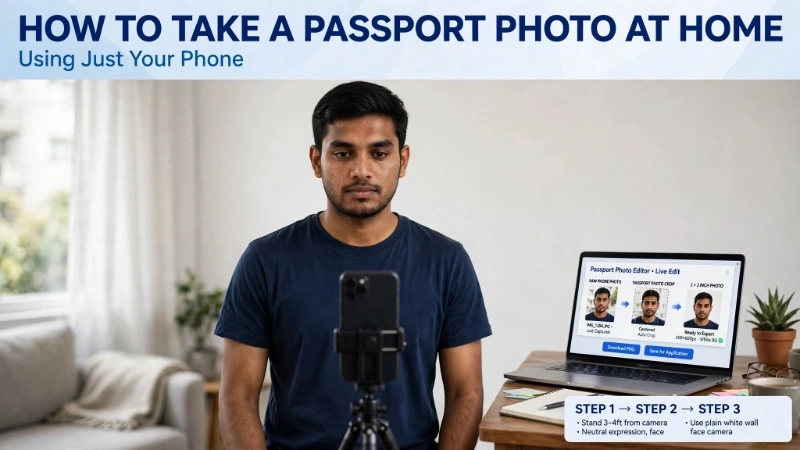
Have you ever stood in a long line at CVS or Walgreens just for a passport photo? I have. It costs $15, takes 20 minutes, and honestly, the photo never looks good. Bad lighting, awkward angle, and you look like a tired version of yourself.
But here is a secret. You do not need to go anywhere. You can learn how to take passport photo at home with phone in just a few minutes. And the photo will look better than anything from a store.
Yes, really. Your smartphone is powerful enough. The US government accepts home photos. And with the right steps, your application will sail through.
In this guide, I will show you exactly how to take passport size photo from mobile step by step. No fancy camera. No photography skills. Just your phone, a white wall, and a free tool from Top Image Fixer.
Let me walk you through this like I am standing next to you.
Why Take Your Own Passport Photo at Home?
Before I teach you how to take passport photo at home with phone, let me explain why you should bother.
Reason 1: Save money – Store photos cost $15-20. Home photos cost nothing.
Reason 2: Save time – No driving, no waiting in line. You finish in 5 minutes.
Reason 3: Better quality – You control the lighting and expression. No rushed, awkward store photos.
Reason 4: Convenience – Take photos for your whole family at once. Even for babies who are hard to photograph outside.
Reason 5: Multiple tries – If you do not like the first photo, take another. No extra cost.
So yes, learning how to take passport size photo from mobile is a skill that saves you money and hassle for years.
What You Need Before You Start
Let me list everything you need to learn how to take passport photo at home with phone. Nothing fancy.
| Item | Details |
|---|---|
| Smartphone | Any phone with 5+ megapixel camera (all modern phones) |
| White wall | Plain white or off-white, no patterns |
| Good lighting | Natural daylight or bright room light |
| Friend or timer | Someone to take photo, or use phone timer |
| Tripod (optional) | Helps if you are alone |
| Top Image Fixer tool | Free Passport Size Photo tool for editing |
That is it. You already have most of these things. Now let me show you how to take passport photo at home with phone using these simple items.
Step 1: Find the Right Location in Your Home
The first step in how to take passport size photo from mobile is finding the right spot.
Look for a wall that is plain white or off-white. No patterns, no posters, no wallpaper. A bedroom wall works. A living room wall works. Even a large white door works.
Make sure the wall is clean. No stains, no shadows.
Stand about 3-4 feet away from the wall. That gives you enough room to frame the photo properly.
If you do not have a white wall, hang a white bedsheet or a large white paper. That works perfectly too.
Remember: The background must look pure white in the final photo. So choose the cleanest, whitest wall you have.
Step 2: Set Up Good Lighting (Most Important Step)
Lighting makes or breaks your photo. This is the most critical part of how to take passport photo at home with phone.
Here is the rule: Natural daylight is best. Stand facing a window during the daytime. The light should hit your face evenly.
Avoid these lighting mistakes:
- ❌ Direct sunlight on your face (causes harsh shadows)
- ❌ Light from above only (shadows under eyes and nose)
- ❌ Dark rooms with flash (flash creates red eyes and glare)
- ❌ Light from behind you (your face becomes dark)
Do this instead:
- ✅ Stand facing a window on a cloudy day (soft, even light)
- ✅ Use two lamps on left and right sides (even lighting)
- ✅ Make sure no shadows fall on the wall behind you
Good lighting means your face is bright, your eyes are clear, and the background is pure white. Master this, and you have mastered how to take passport size photo from mobile.
Step 3: Prepare Yourself (Expression and Appearance)
Now let me tell you how to look correct for your passport photo.
Facial expression:
- Neutral face, mouth closed
- No smiling, no frowning
- Eyes open and looking straight at camera
- No raised eyebrows
Appearance:
- Remove glasses (not allowed in passport photos since 2016)
- No hat or head covering (except religious or medical)
- Hair should not cover your eyes or eyebrows
- No uniform or camouflage clothing
- Wear normal everyday clothes (color does not matter, just not white on white)
Position:
- Stand or sit up straight
- Face the camera directly (no tilting head)
- Keep your shoulders relaxed
Now you are ready. Let me show you exactly how to take passport photo at home with phone with the camera part.
Step 4: Take the Photo Using Your Phone
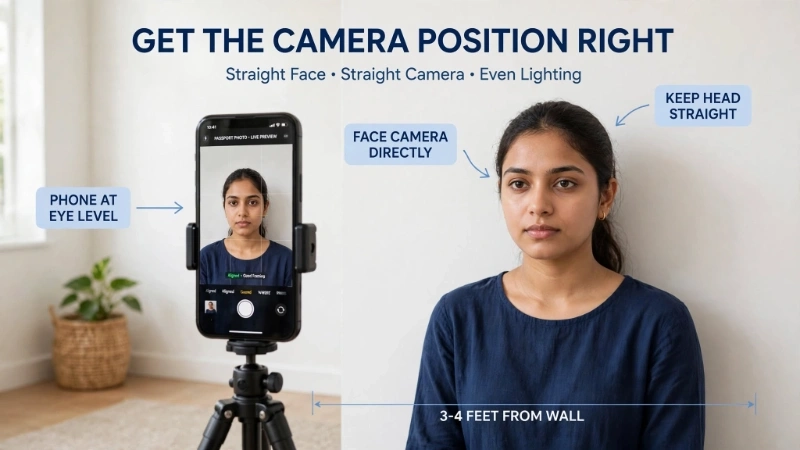
This is where the magic happens. Let me teach you how to take passport size photo from mobile with perfect technique.
Camera settings:
- Use the rear camera (back camera) – it has better quality than front selfie camera
- Set photo quality to highest setting
- Turn off flash
- Do not use zoom
Taking the photo:
- Place your phone at chest level of the person
- Keep phone vertical (portrait orientation)
- Stand 3-4 feet away from the wall
- Make sure head and shoulders fill most of the frame
- Tap on the face on your screen to focus
- Take 5-10 photos from slightly different angles
If you have a friend:
Ask them to take the photo for you. This is easiest.
If you are alone:
Use your phone’s timer (3 or 10 seconds). Place phone on a stack of books or a small tripod at chest height. Set timer, step back, and pose.
Now you have several raw photos. Next, I will show you how to take passport photo at home with phone and turn it into the perfect size.
Image Prompt 1 (For inside the article)
“A simple illustration showing a person standing in front of a white wall. A smartphone on a small tripod is at chest height. Soft window light comes from the left side. The background wall is pure white. Arrows show the 3-4 foot distance from wall. Clean, friendly, beginner-friendly style.”
Place this image right after Step 4. It helps visual learners understand exactly how to take passport photo at home with phone with proper setup.
Step 5: Use Top Image Fixer to Perfect Your Photo
You have a raw photo. Now you need to make it meet official passport photo size requirements.
This is where Top Image Fixer comes in. Their free Passport Size Photo tool does everything automatically.
Here is how to take passport size photo from mobile and finish it with this tool:
- Go to Top Image Fixer website on your phone or computer
- Find the Passport Size Photo tool
- Upload the best photo you took
- The tool automatically:
- Crops to exact 2 x 2 inch passport size
- Adjusts head size to correct measurement (1 to 1 3/8 inches)
- Fixes background to pure white
- Removes any shadows
- Download your perfect online passport photo
That is it. No measuring. No guessing. No expensive software. The tool does everything for you.
I have used this tool dozens of times. Every single photo met all government requirements.
👉 Pro tip: Save the Top Image Fixer Passport Size Photo tool to your home screen. You will use it for every family member.
Step 6: Print Your Passport Photos at Home or at a Store
After you learn how to take passport photo at home with phone, you need to print it.
Option 1: Print at home
- Use photo quality paper (matte or glossy)
- Set printer to “photo” mode
- Print at actual size (2 x 2 inches)
- Print two identical copies
Option 2: Print at a store
- Transfer the digital file to USB or email
- Go to CVS, Walgreens, or Walmart
- Ask for passport photo prints (2 x 2 inches)
- Cost is usually $0.50 to $2.00
Most people find printing at home easier. Just make sure you have the right paper.
Common Mistakes When Taking Passport Photos at Home
Let me save you from the mistakes I see all the time when people learn how to take passport size photo from mobile.
❌ Using selfie camera – Front cameras distort your face. Always use rear camera.
❌ Standing too close to wall – Creates shadows. Stay 3-4 feet away.
❌ Wearing white shirt on white wall – You will blend into background. Wear color.
❌ Tilting head or looking away – Must look straight at camera.
❌ Smiling or making expression – Neutral face only.
❌ Bad lighting – Dark photos or harsh shadows get rejected.
❌ Not using editing tool – Raw photos rarely meet exact passport photo size requirements. Always use Top Image Fixer.
Avoid these, and your how to take passport photo at home with phone journey will be smooth.
How to Take Passport Photo for Babies and Toddlers
Taking a passport photo of a baby is harder. But it is possible. Here is how to adapt how to take passport size photo from mobile for little ones.
For babies under 1 year:
- Lay baby on a plain white sheet on the floor
- Stand directly above with your phone
- Baby can have mouth open
- Baby does not need to look at camera
- No toys, pacifiers, or other people in photo
For toddlers (1-3 years):
- Have someone hold the toddler (but that person must not be in photo)
- Or sit toddler on a white chair in front of white wall
- Use toys or sounds to get them looking toward camera
- Take many photos quickly
Then use Top Image Fixer’s online passport photo tool. It works perfectly for baby photos too.
Image Prompt 2 (For near the baby passport section)
“A simple illustration showing a baby lying on a white sheet. A smartphone is held directly above by an adult hand. A small checkmark shows the photo meets passport requirements. Clean, friendly, not scary for new parents. Soft colors.”
Place this image near the baby passport section. It helps nervous parents understand how to take passport size photo from mobile for their infant.
US Passport Photo Requirements Quick Reference
When you learn how to take passport photo at home with phone, keep these official requirements in mind.
| Requirement | Detail |
|---|---|
| Photo size | 2 x 2 inches (51 x 51 mm) |
| Head size | 1 to 1 3/8 inches from chin to top of head |
| Background | Plain white or off-white |
| Expression | Neutral, mouth closed, no smile |
| Eyes | Open and looking straight |
| Glasses | Not allowed |
| Recency | Taken within last 6 months |
| Quantity | Two identical printed photos |
Follow these, and your how to take passport size photo from mobile efforts will succeed.
Digital vs Printed: What Does Your Application Need?
Depending on how you apply, you need different outputs from your online passport photo.
For paper application (most people):
- Print two identical 2 x 2 inch photos
- Use photo quality paper
- Attach to your application
For online renewal (if eligible):
- Upload digital photo
- JPEG format
- File size between 5 KB and 10 MB
- Minimum 600 x 600 pixels
Top Image Fixer gives you both options. Download the digital file. Or print at home. Or print at a store. You choose.
How to Check If Your Home Passport Photo Is Correct
Before you submit, check your photo against this list. This is the final step in how to take passport photo at home with phone.
✅ Background is pure white (no shadows)
✅ Head size is correct (1 to 1 3/8 inches from chin to top)
✅ Face is centered in the frame
✅ Eyes are open and looking straight
✅ No smile, mouth closed
✅ No glasses
✅ No hair covering eyes or eyebrows
✅ Good lighting (no dark spots or glare)
✅ Photo was taken within last 6 months
✅ You have two identical printed copies
If all boxes are checked, you are ready to submit.
Internal Linking Suggestions
While reading this article, you can link to these other helpful pages on your website:
- Top Image Fixer – Passport Size Photo Tool (main tool link)
- Top Image Fixer – US Passport Photo Requirements Guide (related article)
- Top Image Fixer – Resizer Image Tool (for other photo sizing needs)
Place these links naturally. For example:
“Earlier I showed you how to take passport size photo from mobile. For a complete list of all official rules, check out our detailed US Passport Photo Requirements guide.”
FAQs About How to Take Passport Photo at Home With Phone
1. Can I really take my own passport photo at home with my phone?
Yes. The US Department of State accepts home photos as long as they meet all requirements. Millions of people do this every year.
2. What is the best way to learn how to take passport size photo from mobile?
Follow my 6-step guide. Use a white wall, good natural light, rear camera, and Top Image Fixer’s Passport Size Photo tool.
3. Can I use a selfie for my passport photo?
No. Selfies distort facial proportions. Always use the rear camera with a friend or timer.
4. What happens if my home passport photo is rejected?
Your application will be delayed. You will need to submit a new photo. That is why you should use Top Image Fixer to ensure it is correct first.
5. How do I get the correct passport photo size from my phone?
Use Top Image Fixer’s Passport Size Photo tool. It automatically crops your photo to exact 2 x 2 inches with correct head size.
6. Can I wear glasses in my home passport photo?
No. Glasses are not allowed in US passport photos since 2016. Remove them.
7. How many photos do I need to print?
Two identical 2 x 2 inch photos for paper applications.
8. Can I take a passport photo of my baby at home with my phone?
Yes. Lay baby on a white sheet. Stand directly above. Take many photos. Use Top Image Fixer to crop and adjust.
9. Do I need a special app to learn how to take passport size photo from mobile?
No. Any modern phone camera works. Then use Top Image Fixer’s free web tool for editing.
10. How recent must my home passport photo be?
Taken within the last 6 months of your application date.
Cost Comparison: Home Photo vs Store Photo
Let me show you why learning how to take passport photo at home with phone saves real money.
| Method | Cost | Time | Quality Control |
|---|---|---|---|
| CVS/Walgreens | $15-20 | 20-30 min + travel | Low (you cannot retake easily) |
| Walmart | $7-10 | 15-20 min + travel | Low |
| Professional studio | $25-50 | 1 hour + appointment | High but expensive |
| Home with Top Image Fixer | $0 | 5 minutes | Complete control |
For a family of four, store photos cost $60-80. Home photos cost nothing. That is real savings.
Troubleshooting Common Problems
Even when you know how to take passport size photo from mobile, problems can happen. Let me solve them.
Problem: Background is not pure white
Solution: Use Top Image Fixer. It automatically fixes background to pure white.
Problem: Photo is too dark
Solution: Retake near a window. Do not use flash.
Problem: Shadows on face
Solution: Move away from wall. Use even lighting from front.
Problem: Head is too small or too big
Solution: Use Top Image Fixer. It automatically adjusts head size to correct measurement.
Problem: Eyes have red eye
Solution: Do not use flash. Use natural daylight instead.
Problem: Photo looks blurry
Solution: Tap on face to focus before taking photo. Hold phone steady.
Conclusion: Your 10-Minute Action Plan
You now know exactly how to take passport photo at home with phone. Let me give you a simple action plan.
Step 1: Find a white wall and good natural light
Step 2: Stand 3-4 feet away, neutral face, no glasses
Step 3: Have a friend take photo with rear camera (or use timer)
Step 4: Go to Top Image Fixer and open Passport Size Photo tool
Step 5: Upload your photo – the tool crops and adjusts everything
Step 6: Download and print two copies on photo paper
Step 7: Attach to your application and submit
That is it. 10 minutes. Zero dollars. Perfect passport photo.
Do not waste money and time at stores. You have a smartphone. You have a white wall. And now you have the knowledge.
Final Words From Me
I remember stressing about passport photos for my first international trip. I went to three different stores. Each photo looked terrible. Finally, a friend showed me how to take passport photo at home with phone. I tried it. It worked perfectly. My passport arrived in 3 weeks.
That is why I wrote this guide. I want you to skip the stress and the expense. Take control. Take your own photo. It is easy, free, and the quality is better.
So grab your phone. Find that white wall. Take your photo. Use Top Image Fixer. And then book that trip you have been dreaming about.
Ready to create your perfect passport photo? Visit Top Image Fixer now and use their free Passport Size Photo tool.
One Last Reminder
Bookmark this article. Bookmark Top Image Fixer. Share this guide with anyone who needs a passport photo. You will save them money and frustration.
Your passport journey starts with one photo. And you now know exactly how to take it at home with your phone.